Permissions & Policies
Intro
Cubbit uses a policy-based access control system to manage permissions for users and resources within a project. Policies are JSON documents that define permissions for actions on resources. Policies can be attached to IAM identities (users or groups of users) or directly to resources (buckets) to control access.
Cubbit also support ACL s3 standard to manage access to buckets and objects.
Policy types
Cubbit supports 2 different policy types and ACLs:
- Identity-based policies: Attach policies to IAM identities i.e. users or groups of users. Identity-based policies grant permissions to an identity.
- Resource-based policies: Attach policies directly to resources such as buckets. Resource-based policies grant permissions to the resource to which the policy is attached.
- ACL: Use ACLs to control which users in other projects can access the resource to which the ACL is attached.
Authorization flow
When a request is made to access a DS3 bucket or object, the authorization flow is composed of some steps that provide explicit/implicit allow/deny decisions based on the policies attached to the resource and the identity making the request. The following steps outline the authorization flow:
- Checking authorization via API Key / Secret Key (except for anonymous requests): If the request includes valid API Key and Secret Key credentials, the authorization flow continues to the next step. If the credentials are invalid, the request is denied.
- Evaluating IAM policies: The system evaluates the IAM policies attached to the user associated with the provided credentials. If any IAM policy explicitly denies the requested action on the specified resource, the request is denied. If any IAM policy explicitly allows the requested action on the specified resource, the authorization flow continues to the next step.
- Evaluating Bucket Policies: The system evaluates the bucket policy attached to the target bucket. If the bucket policy explicitly denies the requested action on the specified resource, the request is denied. If the bucket policy explicitly allows the requested action on the specified resource, the request is allowed. If the bucket policy does not explicitly allow or deny the requested action, the request gets checked against provided credentials and continues to the next step.
- Evaluating ACLs: The system evaluates the Access Control Lists (ACLs) associated with the target bucket and object. If any ACL explicitly allows the requested action for the user, the request is allowed. If no ACL explicitly allows the requested action, the request is denied.
Identity-based policies (IAM policies)
Identity-based policies are JSON permissions policy documents that control what actions an identity can perform, on which resources.
An IAM policy is a way to allow or deny users to perform certain actions in a Cubbit project.
You manage access to your Cubbit projects by creating policies and attaching them to IAM identities (users or groups of users).
To create a new IAM user identity for an application or a service, see Service accounts.
Every time an IAM user makes a request, Cubbit evaluates the associated policies to allow or deny access to the resource.
IAM policies define permissions for actions regardless of the method you use to operate. For example, if a policy allows the GetUser action, then a user with that policy can get user information from the Cubbit Console or the Cubbit API.

Project preset policies
The root user has by default all permissions over all resources on the project. This policy can't be changed or deleted. Moreover, it's impossible to assign any other policies to the root user.
Preset policies
When a project is created, some default policies are generated by default:
- Owner: only the root user can be the assignee of the policy. This allows him to do any action on eny resource of the project.
- Admin: this is a super user policy. With this policy assigned, a user has the same power as the owner.
- Member: this policy allows the user to perform the majority of the action on S3 and IAM. It can't update or delete the project settings and assign policies.
- ReadOnly: this policy allows the user to read only the entity of a project.
If you have the right permission, you can then create all the policy combinations you desire.
Policy Definition
Policies are stored in Cubbit as JSON documents. When you create a JSON policy, IAM can perform policy validation to help you create an effective policy. IAM identifies JSON syntax errors and the formal applicability of the policy, i.e. if the resource can be the target of the action.
Policy JSON structure
This is how a policy in Cubbit is defined
{
   "id": "a912ec9a-4623-11ed-b878-0242ac120002",
   "syntax_version": "2023-10-16", // Version of the document syntax
   "name": "Unique Policy Name",
   "description": "This is a generic description for the policy",
   "statement": [
       {
            "effect": "allow", // or "deny"
            "action": [
                "iam:ListUsers"
            ],
            "resource": [
              "crn:region1:iam:project:tenant_b562b6be-cac4-4d2c-840c-fa266228a30f/170bcefb-68f5-479f-9d1e-e8553eaaccb9"
            ]
       }
   ]
}
Effect
allow or deny as a String value
Action
The action field is a list of strings with the action to allow. Every action starts with the domain service, followed by the separator : and then the action name.
See the dedicated section below for all the possible Actions.
Resource - CRN
List of possible resource names defined in Cubbit. This specifies to which resources the policy will be applied to.
See the dedicated section below for more details about CRN.
Groups
Users can be organized into groups. A user can be part of multiple groups at the same time. One or more policies can be associated with each group.
A user can have policies assigned via groups or individually. Policies assigned to a single user are more important than those assigned via a group.
As with policies assigned to a single user, Deny is the default.
Below we see a table that explains the possible combination of policies on the same resource and same action.
| Effect1 \ Effect2 | Allow user | Allow group | Deny user | Deny group |
|---|---|---|---|---|
| ** Allow user ** | allow | allow | deny | allow |
| ** Allow group ** | allow | allow | deny | deny |
| ** Deny user ** | deny | deny | deny | deny |
| ** Deny group ** | allow | deny | deny | deny |
Actions
One or more actions are involved in the policy.
The actions must match the target resource in the CRN target. So for example you can't define a policy with iam:CreateGroup on a resource of type bucket
IAM Actions
| Action | Target Resource | Description |
|---|---|---|
| iam:GetProject | project | Grants permission to retrieve the project's information |
| iam:ManageProject | project | Grants permission to update and delete the project |
| iam:CreateUser | project | Grants permission to create and invite a new IAM user |
| iam:ListUsers | project | Grants permission to get the list of IAM user of the project |
| iam:ManageUsers | user | Grants permission to delete and update a IAM user |
| iam:GetUser | user | Grants permission to retrieve a IAM user |
| iam:AttachUserPolicy | user | Grants permission to attach a managed policy to the specified IAM user |
| iam:CreatePolicyVersion | policy | Grants permission to create a new version of the specified managed policy |
| iam:DeletePolicy | policy | Grants permission to delete the specified managed policy and remove it from any IAM entities (users or groups) to which the policy is attached |
| iam:DetachUserPolicy | user | Grants permission to detach a managed policy from the specified IAM user |
| iam:GetPolicy | policy | Grants permission to retrieve information about the specified managed policy, including the policy's default version and the total number of identities to which the policy is attached |
| iam:ListAttachedUserPolicies | user | Grants permission to list all managed policies that are attached to the specified IAM user |
| iam:ListEntitiesForPolicy | policy | Grants permission to list all IAM identities to which the specified managed policy is attached |
| iam:ListPolicies | policy | Grants permission to list all managed policies |
| iam:CreatePolicy | policy | Grants permission to create a new managed policy |
| iam:CreateKey | user | Grants permission to create a new key |
| iam:ListKeys | user | Grants permission to get the list of an user keys |
| iam:ManageKey | user | Grants permission to delete and update name of a key of an IAM user |
| iam:CreateGroup | group | Grants permission to create a group |
| iam:ManageGroup | group | Grants permission to update a group |
| iam:ListGroup | group | Grants permission to list the groups in the project |
| iam:GetGroup | group | Grants permission to get the group details |
| iam:DeleteGroup | group | Grants permission to delete a group |
| iam:AddGroupUser | group | Grants permission to add a user to a group |
| iam:RemoveGroupUser | group | Grants permission to remove a user from a group |
| iam:AttachGroupPolicy | group | Grants permission to attach a policy to a group |
| iam:DetachGroupPolicy | group | Grants permission to remove a policy from a group |
| iam:ListEntitiesForGroup | group | Grants permission to list the policy and user associated with the group |
To operate over the S3, so in example create buckets, uploads objects, you need to grant at least iam:CreateKey, iam:ManageKey and iam:ListKeys to your users
S3 Actions
Actions with CRN "Target Resource" of type * can be only used with *. No other values are permitted
| Action | Target Resource | Description |
|---|---|---|
| s3:ListBucket | bucket | Grants permission to list some or all the objects in a Cubbit S3 bucket (up to 1000) |
| s3:ListBucketVersions | bucket | Grants permission to list metadata about all the versions of objects in a Cubbit S3 bucket |
| s3:PutObject | object | Grants permission to add an object to a bucket or a specific folder |
| s3:GetObject | object | Grants permission to retrieve an object |
| s3:GetObjectVersion | object | Grants permission to retrieve a specific version of an object |
| s3:DeleteObject | object | Grants permission to remove the null version of an object and insert a delete marker, which becomes the current version of the object |
| s3:DeleteObjectVersion | object | Grants permission to remove a specific version of an object |
| s3:AbortMultipartUpload | object | Grants permission to abort a multipart upload |
| s3:ListMultipartUploadParts | object | Grants permission to list the parts that have been uploaded for a specific multipart upload |
| s3:GetObjectTagging | object | Grants permission to return the tag set of an object |
| s3:GetObjectAcl | object | Grants permission to return the access control list (ACL) of an object |
| s3:GetObjectVersionAcl | object | Grants permission to return the access control list (ACL) of a specific object version |
| s3:PutObjectAcl | object | Grants permission to set the access control list (ACL) permissions for new or existing objects in an S3 bucket |
| s3:PutObjectVersionAcl | object | Grants permission to use the acl subresource to set the access control list (ACL) permissions for an object that already exists in a bucket |
| s3:PutObjectRetention | object | Grants permission to place an Object Retention configuration on an object |
| s3:GetObjectRetention | object | Grants permission to get the object retention |
| s3:PutObjectLegalHold | object | Grants permission to apply a Legal Hold configuration to the specified object |
| s3:GetObjectLegalHold | object | Grants permission to get the object legal hold config |
| s3:BypassGovernanceRetention | object | Grants permission to delete a object protected by object retention |
| s3:ListAllMyBuckets | * | Grants permission to list all buckets owned by the authenticated sender of the request |
| s3:GetBucketVersioning | bucket | Grants permission to return the versioning state of an Cubbit S3 bucket |
| s3:GetEncryptionConfiguration | bucket | Grants permission to return the default encryption configuration an Cubbit S3 bucket |
| s3:CreateBucket | * | Grants permission to create a new bucket |
| s3:DeleteBucket | bucket | Grants permission to delete the bucket named in the URI |
| s3:PutBucketVersioning | bucket | Grants permission to set the versioning state of an existing Cubbit S3 bucket |
| s3:GetBucketOwnershipControls | bucket | Grants permission to retrieve ownership controls on a bucket |
| s3:GetLifecycleConfiguration | bucket | Grants permission to return the lifecycle configuration information set on an Cubbit S3 bucket |
| s3:PutBucketOwnershipControls | bucket | Grants permission to add, replace or delete ownership controls on a bucket, This also gives delete capability |
| s3:PutLifecycleConfiguration | bucket | Grants permission to create a new lifecycle configuration for the bucket or replace an existing lifecycle configuration. |
| s3:ListBucketMultipartUploads | bucket | Grants permission to list in-progress multipart uploads |
| s3:GetBucketObjectLockConfiguration | bucket | Grants permission to get the Object Lock configuration of an Cubbit S3 bucket |
| s3:PutBucketObjectLockConfiguration | bucket | Grants permission to get the object lock configuration |
| s3:GetBucketAcl | bucket | Grants permission to use the acl subresource to return the access control list (ACL) of an Cubbit S3 bucket |
| s3:PutBucketAcl | bucket | Grants permission to set the permissions on an existing bucket using access control lists (ACLs) |
| s3:GetBucketLocation | bucket | Grants permission to get the bucket location |
:::
DS3 Actions
| Action | Target Resource | Description |
|---|---|---|
| ds3:MapBucketNamesAndIDs | bucket | Grants permission to list a mapping between bucket names to ids |
Examples
In this section, we will see some examples of policies to perform some common use cases.
You can always get the CRN of your resource from the Cubbit Console. Each entity has "Copy CRN" context menu item to easily copy it.
Minimum permissions to access the Web Console
This policy gives the bare minimum permissions for a user to sign-in on the Web Console. More in detail, the first section is composed of IAM actions that let a user create and manage its access keys plus the ability to list themselves in the user list. The second section is a single S3 action that is necessary to list all the buckets of the project but without the ability to list the objects inside such buckets.
{
    "syntax_version":"2023-10-16",
    "statement":[
        {
            "effect":"allow",
            "action":[
                "iam:CreateKey",
                "iam:ManageKey",
                "iam:ListKeys",
                "iam:GetUser"
            ],
            "resource":[
                "crn:eu-west-1:iam:user:self"
            ]
        },
        {
            "effect":"allow",
            "action":[
                "s3:ListAllMyBuckets"
            ],
            "resource":[
                "*"
            ]
        }
    ]
}
Basic S3 permissions to read/write objects in a folder
The first section of this policy allows a user to list all the objects and versions of objects inside a specified bucket. It’s possible to extend this policy to multiple buckets by adding a new CRN in the resource field. The second section of the policy is what grants the read, write and delete permissions. In this case, the wildcard * at the end of the CRN means the permissions are valid for the entire bucket but it’s possible to specify a single folder or a single object. Like the previous section, it’s possible to add multiple CRN inside the resource field. Finally, it’s possible to remove or add actions to have more control over the permissions, for example, if only s3:PutObject is left, a user will be able to upload new files without having the ability to download or remove them.
{
    "syntax_version":"2023-10-16",
    "statement":[
        {
            "effect":"allow",
            "action":[
                "s3:ListBucket",
                "s3:ListBucketVersions"
            ],
            "resource":[
                "crn:eu-west-1:s3:bucket:bucket-name"
            ]
        },
        {
            "effect":"allow",
            "action":[
                "s3:PutObject",
                "s3:GetObject",
                "s3:GetObjectVersion",
                "s3:DeleteObject",
                "s3:DeleteObjectVersion"
            ],
            "resource":[
                "crn:eu-west-1:s3:object:bucket-name/*"
            ]
        }
    ]
}
How to migrate from older syntax versions
Policy syntax version 2023-10-16 introduced some changes to the way resources are defined in the policy document.
If you have policies created with an older syntax version, you need to update them to the new format since the older format does not accept the CRN v2 format currently used and returned in the DS3 Console.
To migrate from syntax version 2022-10-07 to 2023-10-16, you need to update the resource field of each statement in the policy document to match CRN v2 format.
To convert a CRN v1 to a CRN v2 follow this pattern:
- crn region service remain the same
- resource-type will be the same
- tenant-id, swarm-id and project-id will be part of the resource-path as
tenant_<tenant_id>/project_<project_id>/ - resource-id will be appended at the end of the resource-path
If you do not have the id, do not add that segment to the resource-path for that resource.
Here an example of migration:
Old format (syntax version 2022-10-07):
{
  "syntax_version": "2022-10-07",
  "name": "Unique Policy Name",
  "description": "This is a generic description for the policy",
  "statement": [
    {
      "effect": "allow",
      "action": [
        "iam:ListUsers"
      ],
      "resource":[
        "crn:region1:iam:b562b6be-cac4-4d2c-840c-fa266228a30f::170bcefb-68f5-479f-9d1e-e8553eaaccb9:project:170bcefb-68f5-479f-9d1e-e8553eaaccb9"
      ]
    }
  ]
}
New format (syntax version 2023-10-16):
{
  "syntax_version":"2023-10-16",
  "name": "Unique Policy Name",
  "description": "This is a generic description for the policy",
  "statement": [
    {
      "effect": "allow",
      "action": [
        "iam:ListUsers"
      ],
      "resource":[
        "crn:region1:iam:project:tenant_b562b6be-cac4-4d2c-840c-fa266228a30f/170bcefb-68f5-479f-9d1e-e8553eaaccb9"
      ]
    }
  ]
}
Check the CRN documentation for more details about the CRN v2 format.
IAM policies in Cubbit Console
You can manage IAM policies easily in the Cubbit Console:
- Go to Policies in the IAM section of the left sidebar.
- View all policies in your project. Click a policy name to edit, or click Create IAM Policy to add a new one.
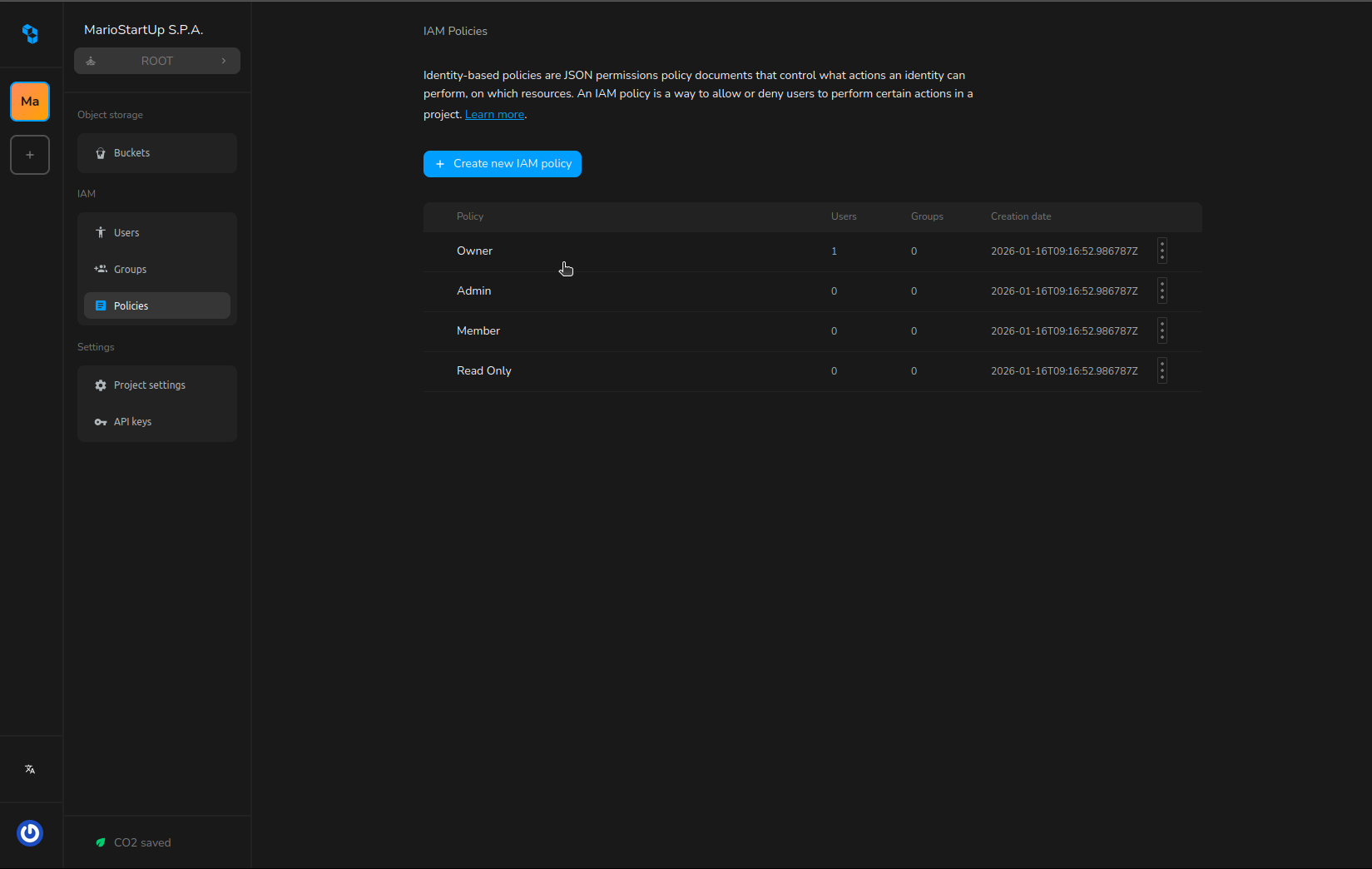
When creating or editing a policy:
- Use the built-in JSON editor to define your policy document, following the structure described above.
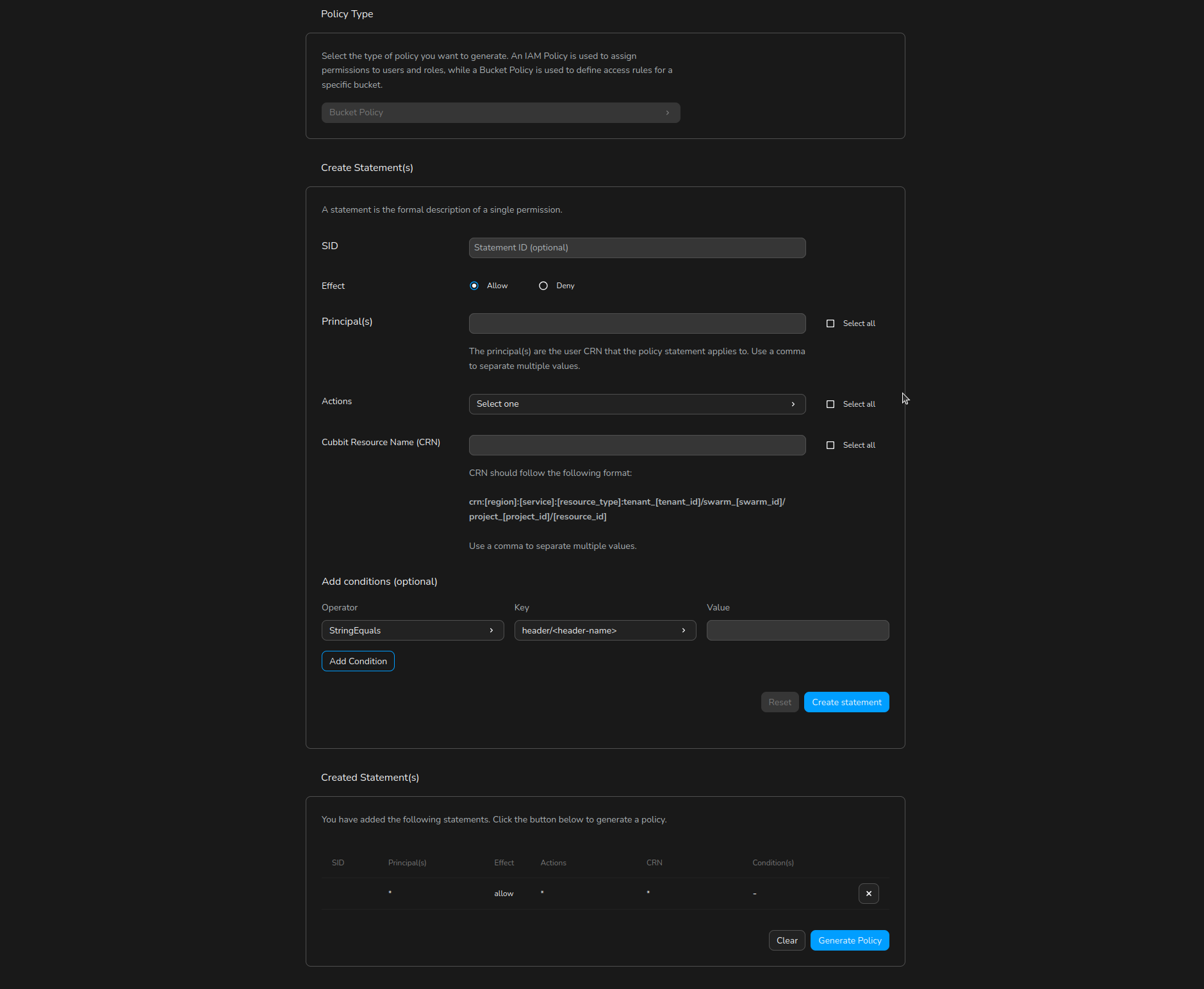
- For a guided experience, click Policy Generator to open a user-friendly form. Select the effect (allow/deny), actions, resources, and conditions for each statement.
- Click Generate Policy to produce a valid JSON policy, which you can further review or edit in the editor.
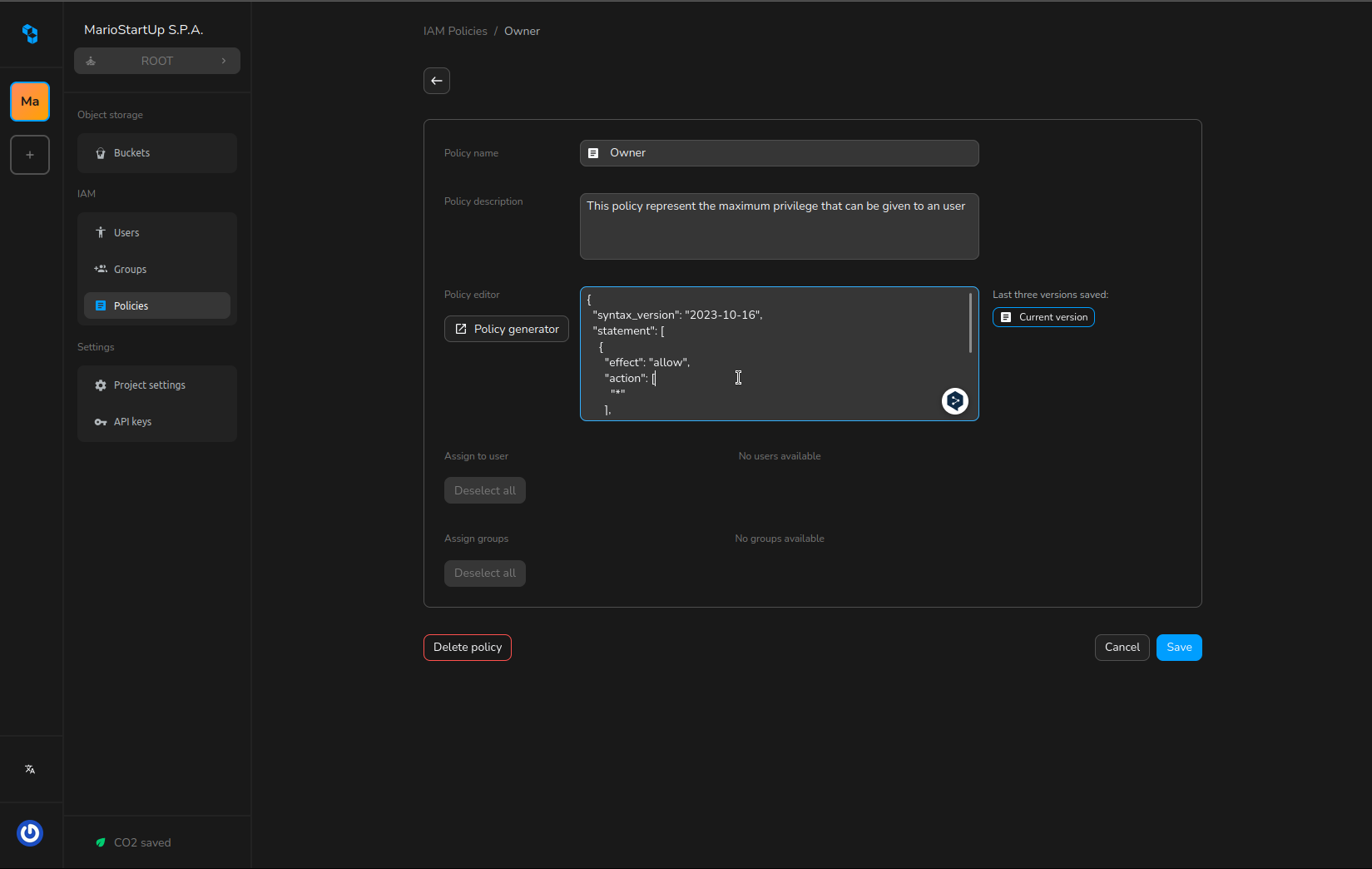
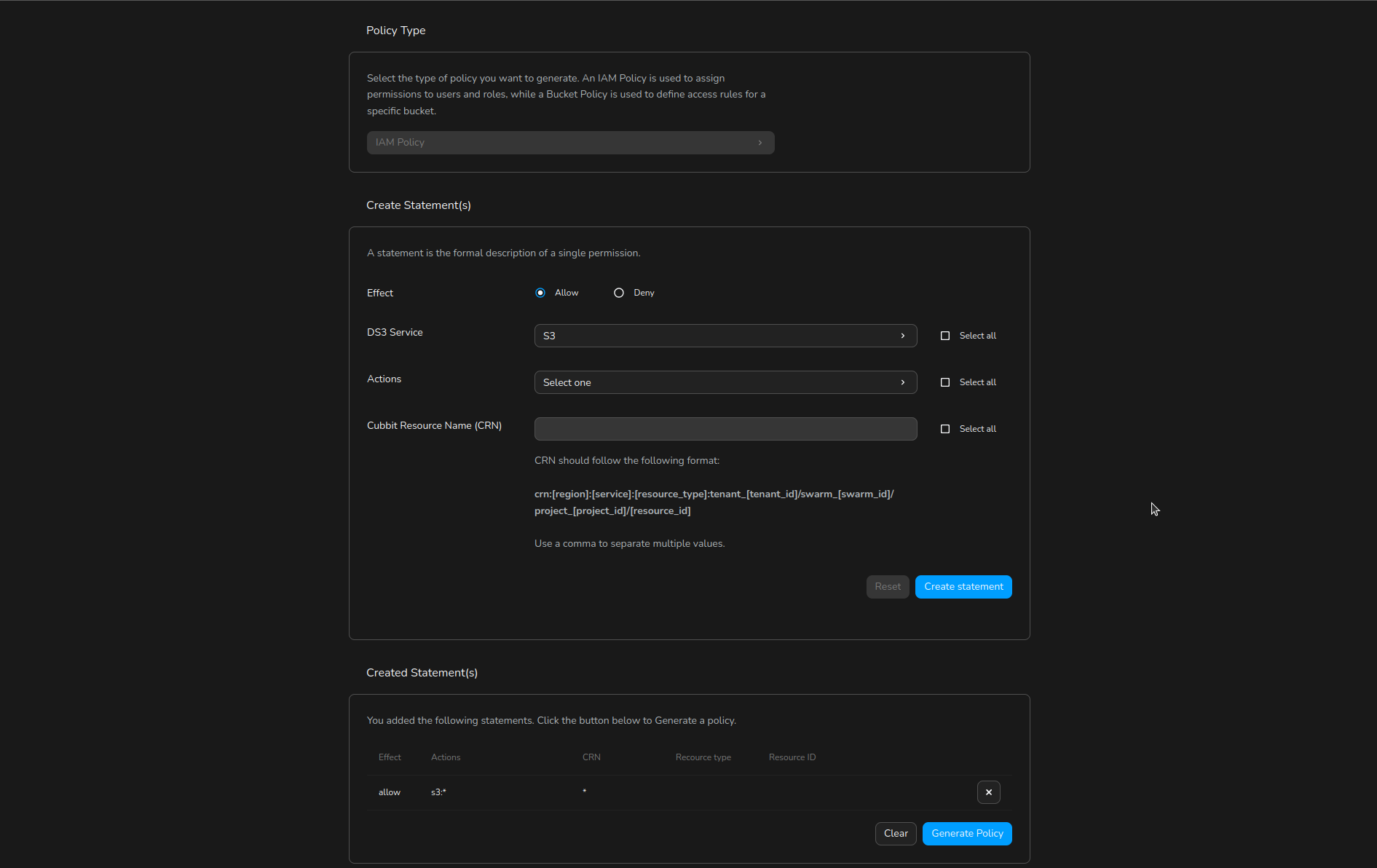
Resource-based policies (Bucket policies)
A bucket policy is a resource-based policy that you can use to manage permissions for your DS3 buckets and the objects within them.
They differ from IAM policies in that they are attached directly to the bucket, rather than to a user. This allows you to define access control rules that apply specifically to the bucket and its contents, regardless of who is making the request.
Bucket policies are written in JSON and specify what actions are allowed or denied for which principals (users) on the specified bucket and its objects. A bucket policy gets attached directly to a bucket, and it applies to all objects defined by the scope written in the policy itself.
You can use bucket policies to control access to your DS3 buckets and objects based on various conditions, such the presence of specific headers in the request, the request being performed by a certain User Agent or the request coming from a specific website (via the Referer header).
Example Bucket Policy, json format
{
  "name": "Test Policy",
  "description": "my beautiful test policy",
  "syntax_version": "2025-03-01",
  "statement": [
    {
      "sid": "SkipAuthenticationForProtectedObjectRetrievalWithProperHeader",
      "effect": "allow",
      "principal": [
        "*"
      ],
      "action": [
        "s3:GetObject"
      ],
      "resource": [
        "crn:eu-west-1:s3:object:tenant_11111111-1111-1111-1111-111111111111/project_6d8a86bf-dfd1-47da-bdec-c36c8e02b7c5/my-bucket/protected/*"
      ],
      "condition": {
        "StringLike": {
          "header/X-Custom-Header": [
            "Custom-Value-*-???"
          ]
        }
      }
    },
    {
      "sid": "SkipAuthenticationForPublicObjectRetrieval",
      "effect": "allow",
      "principal": [
        "*"
      ],
      "action": [
        "s3:GetObject"
      ],
      "resource": [
        "crn:eu-west-1:s3:object:tenant_11111111-1111-1111-1111-111111111111/project_6d8a86bf-dfd1-47da-bdec-c36c8e02b7c5/my-bucket/public/*"
      ]
    },
    {
      "sid": "GetObjectBlockedOnSpecificFile",
      "effect": "deny",
      "principal": [
        "*"
      ],
      "action": [
        "s3:GetObject"
      ],
      "resource": [
        "crn:eu-west-1:s3:object:tenant_11111111-1111-1111-1111-111111111111/project_6d8a86bf-dfd1-47da-bdec-c36c8e02b7c5/my-bucket/*/secret-object"
      ]
    }
  ]
}
The above example policy has 3 statements:
- Allows anyone to perform the
s3:GetObjectaction on any object in the bucket with a key that starts withprotected/, as long as the request includes a header namedX-Custom-Headerwith a value that matches the patternCustom-Value-*-???. - Allows anyone to perform the
s3:GetObjectaction on any object in the bucket with a key that starts withpublic/, without any additional conditions. - Denies access to a specific object named
secret-objectin the same bucket for all principals, overriding any previous allow statements.
The second rule is a common use case, in fact it allows hosting public assets, such as images or videos, in a bucket while still protecting other objects.
Components of a Bucket Policy
A bucket policy consists of several key components:
- Name: A descriptive name for the policy.
- Description: A brief description of the policy's purpose.
- Version: Specifies the version of the policy language. The current version is "2025-03-01".
- Statement: An array of individual statements that define the permissions. Each statement includes:
- Sid (Statement ID): (Optional) An identifier for the statement.
- Effect: Specifies whether the statement allows or denies access. Valid values are "allow" and "deny".
- Principal: Specifies the user to which the policy applies. You can use "*" to indicate all users.
- Action: Specifies the actions that are allowed or denied. For example, "s3:GetObject" allows reading objects from the bucket. A list of all available actions is provided below.
- Resource: Specifies the bucket and objects to which the policy applies, using their Cubbit Resource Names (CRNs). The "*" wildcard matches one or more characters. The "?" wildcard matches exactly one character.
- Condition: (Optional) Specifies conditions under which the policy is in effect, such as specific headers in the request.
Principal
The principal is the user to which the policy applies. You can use "*" to indicate all users. The principal needs to be specified with its CRN.
Action
Here's a list of all the available actions that can be specified in a bucket policy:
s3:GetObject- Required to read objects from a bucket.s3:GetObjectVersion- Required to read specific versions of objects from a versioned bucket.s3:DeleteObject- Required to delete objects from a bucket.s3:DeleteObjectVersion- Required to delete specific versions of objects from a versioned bucket.s3:PutObject- Required to add objects to a bucket.s3:AbortMultipartUpload- Required to abort a multipart upload.s3:GetObjectLegalHold- Required to read the legal hold status of an object.s3:PutObjectLegalHold- Required to set the legal hold status of an object.s3:ListBucket- Required to list the objects in a bucket.s3:ListBucketVersions- Required to list the versions of objects in a versioned bucket.s3:ListBucketMultipartUploads- Required to list ongoing multipart uploads in a bucket.s3:ListMultipartUploadParts- Required to list the parts of a specific multipart upload.s3:GetLifecycleConfiguration- Required to read the lifecycle configuration of a bucket.s3:PutLifecycleConfiguration- Required to set the lifecycle configuration of a bucket.s3:GetBucketOwnershipControls- Required to read the ownership controls of a bucket.s3:PutBucketOwnershipControls- Required to set the ownership controls of a bucket.s3:DeleteBucket- Required to delete a bucket.s3:GetBucketAcl- Required to read the access control list (ACL) of a bucket.s3:PutBucketAcl- Required to set the access control list (ACL) of a bucket.s3:GetBucketLocation- Required to read the location constraint of a bucket.s3:GetBucketVersioning- Required to read the versioning state of a bucket.s3:PutBucketVersioning- Required to set the versioning state of a bucket.s3:GetBucketObjectLockConfiguration- Required to read the object lock configuration of a bucket.s3:PutBucketObjectLockConfiguration- Required to set the object lock configuration of a bucket.s3:GetObjectRetention- Required to read the retention settings of an object.s3:PutObjectRetention- Required to set the retention settings of an object.s3:GetObjectAcl- Required to read the access control list (ACL) of an object.s3:PutObjectAcl- Required to set the access control list (ACL) of an object.
Some actions refer to a bucket, while others refer to an object. Make sure to specify the correct resource type in the policy statement. See the Resources section for more details.
Common S3 operations and their required Actions
GetObjectrequiress3:GetObjectwhen reading an objects3:GetObjectVersionwhen reading a specific version of an object in a versioned bucket
PutObjectrequiress3:PutObjectwhen adding an object to a bucket
CreateMultipartUpload,UploadPartandCompleteMultipartUploadrequires3:PutObject
ListObjectsV2requiress3:ListBucketwhen listing objects in a bucket
HeadObjectrequiress3:GetObjectwhen retrieving metadata of an objects3:GetObjectVersionwhen retrieving metadata of a specific version of an object in a versioned bucket
DeleteObjectandDeleteObjectsrequires3:DeleteObjectwhen deleting an objects3:DeleteObjectVersionwhen deleting a specific version of an object in a versioned bucket
PutObjectRetentionrequiress3:PutObjectRetentionwhen setting retention settings for an object
Resources
A resource specifies the bucket and/or objects to which the policy applies, using their Cubbit Resource Names (CRNs). Wildcard characters can be used in the resource specification:
*(asterisk): Matches zero or more characters. For example,crn:eu-west-1:s3:object:tenant_11111111-1111-1111-1111-111111111111/project_6d8a86bf-dfd1-47da-bdec-c36c8e02b7c5/my-bucket/images/*matches all objects within theimages/folder of the specified bucket.?(question mark): Matches exactly one character. For example,crn:eu-west-1:s3:object:tenant_11111111-1111-1111-1111-111111111111/project_6d8a86bf-dfd1-47da-bdec-c36c8e02b7c5/my-bucket/image?.jpgmatches objects likeimage1.jpg,imageA.jpg, but notimage10.jpg.
Depending on the action specified in the policy statement, the resource can refer to either the bucket itself or the objects within the bucket. For example:
- For actions like
s3:ListBucket, the resource should refer to the bucket CRN (e.g.,crn:eu-west-1:s3:bucket:tenant_11111111-1111-1111-1111-111111111111/project_6d8a86bf-dfd1-47da-bdec-c36c8e02b7c5/my-bucket). - For actions like
s3:GetObject, the resource should refer to the object CRN (e.g.,crn:eu-west-1:s3:object:tenant_11111111-1111-1111-1111-111111111111/project_6d8a86bf-dfd1-47da-bdec-c36c8e02b7c5/my-bucket/my-object.txt).
Example
A GetObject requires an Object CRN in the statement resource, not a Bucket CRN.
"statement": [
  {
    "sid": "SkipAuthenticationForPublicObjectRetrieval",
    "effect": "allow",
    "principal": ["*"],
    "action": ["s3:GetObject"],
    "resource": [ // using a bucket CRN
      "crn:eu-west-1:s3:object:tenant_11111111-1111-1111-1111-111111111111/project_6d8a86bf-dfd1-47da-bdec-c36c8e02b7c5/my-bucket"
    ]
  }
]
Use an Object CRN instead.
"statement": [
  {
    "sid": "SkipAuthenticationForPublicObjectRetrieval",
    "effect": "allow",
    "principal": ["*"],
    "action": ["s3:GetObject"],
    "resource": [ // using an object CRN
      "crn:eu-west-1:s3:object:tenant_11111111-1111-1111-1111-111111111111/project_6d8a86bf-dfd1-47da-bdec-c36c8e02b7c5/my-bucket/public/*"
    ]
  }
]
Resource type by action
Here's a list of bucket policy actions and their corresponding resource types:
| Action | Resource Type |
|---|---|
| s3:ListBucket | Bucket CRN |
| s3:ListBucketVersions | Bucket CRN |
| s3:GetLifecycleConfiguration | Bucket CRN |
| s3:PutLifecycleConfiguration | Bucket CRN |
| s3:GetBucketOwnershipControls | Bucket CRN |
| s3:PutBucketOwnershipControls | Bucket CRN |
| s3:DeleteBucket | Bucket CRN |
| s3:GetBucketAcl | Bucket CRN |
| s3:PutBucketAcl | Bucket CRN |
| s3:GetBucketLocation | Bucket CRN |
| s3:GetBucketVersioning | Bucket CRN |
| s3:PutBucketVersioning | Bucket CRN |
| s3:GetBucketObjectLockConfiguration | Bucket CRN |
| s3:PutBucketObjectLockConfiguration | Bucket CRN |
| s3:ListBucketMultipartUploads | Bucket CRN |
| s3:GetObject | Object CRN |
| s3:GetObjectVersion | Object CRN |
| s3:DeleteObject | Object CRN |
| s3:DeleteObjectVersion | Object CRN |
| s3:PutObject | Object CRN |
| s3:AbortMultipartUpload | Object CRN |
| s3:GetObjectLegalHold | Object CRN |
| s3:PutObjectLegalHold | Object CRN |
| s3:GetObjectRetention | Object CRN |
| s3:PutObjectRetention | Object CRN |
| s3:GetObjectAcl | Object CRN |
| s3:PutObjectAcl | Object CRN |
| s3:ListMultipartUploadParts | Object CRN |
Conditions
A condition is a complex object that uses "operators" to compare a "condition key" (such as a request header) with one or more values. Conditions allow you to specify additional constraints on when a policy statement is in effect.
Condition keys
The available condition keys are:
header/<header-name>- Matches the value of a specific HTTP header in the request.referer- Matches the value of the Referer header in the request.user-agent- Matches the value of the User-Agent header in the request.
Operators
The available operators are:
StringEquals- The condition is true if the value of the condition key is exactly equal to one of the specified values.StringEqualsIfExists- The condition is true if the value of the condition key is exactly equal to one of the specified values, or if the condition key does not exist in the request.StringEqualsIgnoreCase- The condition is true if the value of the condition key is equal to one of the specified values, ignoring case differences.StringEqualsIgnoreCaseIfExists- The condition is true if the value of the condition key is equal to one of the specified values, ignoring case differences, or if the condition key does not exist in the request.StringLike- The condition is true if the value of the condition key matches one of the specified values, which can include wildcard characters (*and?).StringLikeIfExists- The condition is true if the value of the condition key matches one of the specified values, which can include wildcard characters (*and?), or if the condition key does not exist in the request.StringNotEquals- The condition is true if any of the specified keys are present in the request context and their values do not match any of the specified values. If the key is not in the context, evaluates to false.StringNotEqualsIfExists- The condition is true if any of the specified keys are present in the request context and their values do not match any of the specified values. If the key is not in the context, evaluates to true.StringNotEqualsIgnoreCase- The condition is true if any of the specified keys are present in the request context and their values do not match any of the specified values, ignoring case differences. If the key is not in the context, evaluates to false.StringNotEqualsIgnoreCaseIfExists- The condition is true if any of the specified keys are present in the request context and their values do not match any of the specified values, ignoring case differences. If the key is not in the context, evaluates to true.StringNotLike- The condition is true if any of the specified keys are present in the request context and their values do not match any of the specified values, which can include wildcard characters (*and?). If the key is not in the context, evaluates to false.StringNotLikeIfExists- The condition is true if any of the specified keys are present in the request context and their values do not match any of the specified values, which can include wildcard characters (*and?). If the key is not in the context, evaluates to true.Null- The condition is true if the specified key is not present in the request context.
Combining conditions
When an operator contains multiple keys, the condition evaluates to true if all of the keys match (logical AND). The same applies when a condition contains multiple operators (also logical AND).
For example:
"condition": {
  "StringEquals": {
    "header/X-Custom-Header": [
      "Custom-Value"
    ],
    "referer": [
      "https://example.com/*"
    ]
  },
  "StringLike": {
    "user-agent": [
      "*Mozilla*"
    ]
  }
}
In the above example, the condition evaluates to true only if both the X-Custom-Header matches Custom-Value, the Referer header matches https://example.com/* and the User-Agent header matches *Mozilla*.
To provide an OR logic between multiple conditions, you can use different statements within the same policy, each with its own condition.
Bucket policies in Cubbit Console
You can manage bucket policies directly from the Cubbit Console, within the bucket's Permissions tab:
To view or edit a bucket policy:
- In the Buckets list, open the context menu for your bucket (click the 3-dots or right-click the bucket name) and select Manage.
- Go to the Permissions tab in the Bucket Settings page.
- Scroll to the Bucket Policy section to see the current policy document.
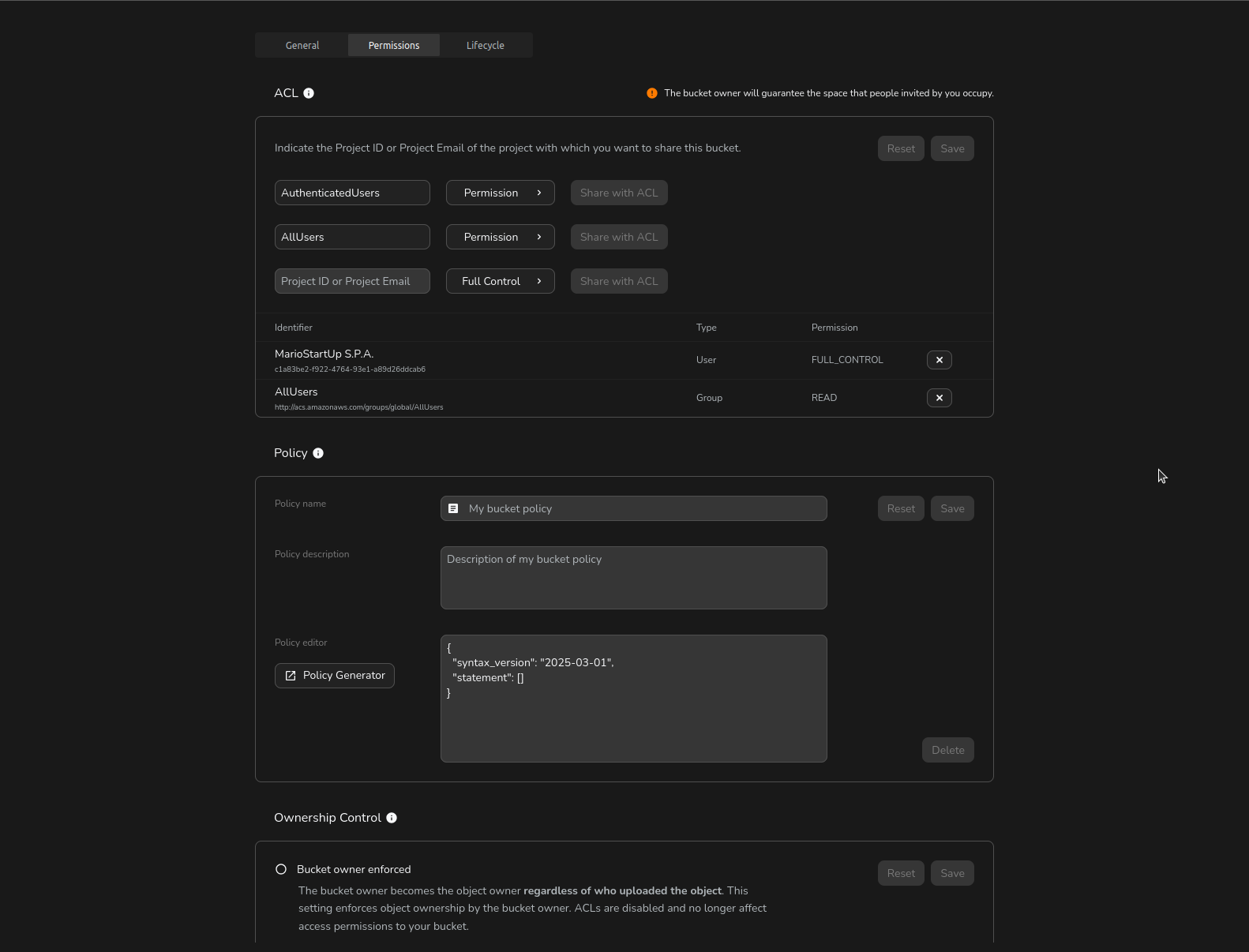
To create or update a bucket policy:
- Use the built-in JSON editor to write or modify the policy, following the structure described above.
- For a guided experience, click Policy Generator to open a user-friendly form. Select the effect (allow/deny), principal(s), actions, resources, and conditions for each statement.
- Click Generate Policy to produce a valid JSON policy, which you can further review or edit in the editor.
- Click Save to apply your changes to the bucket policy.
ACL
ACL stands for Access Control List, which is used to set permissions on buckets and objects and it's fully supported by Cubbit.
ACLs are used to grant permissions to specific Cubbit Projects or groups in order to perform specific actions on a bucket or object. Two types of ACLs can be used:
- Bucket ACLs: these ACLs are used to grant permissions for actions on a bucket.
- Object ACLs: these ACLs are used to grant permissions for actions on an individual object within a bucket.
ACLs are considered a legacy access control mechanism in S3 and their usage is generally discouraged in favor of more modern and flexible mechanisms like Bucket Policies.
Main concepts
Let's quickly go through some ACL main concepts and terminology. We'll cover what are grantees and how they can be identified, which permissions can be granted, and what is a canned ACL.
Grantee
A grantee is the Cubbit Project or group that is granted permission by an ACL. There are two ways to identify a grantee when setting a ACL:
- Cubbit Project ID: you can specify the grantee as a Cubbit Project ID, using the id parameter. For example:
id=111122223333. - Predefined group: you can specify the grantee as a predefined group, using the URI parameter. S3 protocol provides the following predefined groups:
AuthenticatedUsers: any Cubbit Project that is authenticated.AllUsers: any users on the internet.
- To specify a predefined group, you can use the URI parameter and the URL of the group. For example:
uri=http://acs.amazonaws.com/groups/global/AllUsers.
Permissions that can be granted
S3 ACLs can be used to grant the following permissions:
READ- when granted on a bucket allows the grantee to list the objects of the bucket
- when granted on an object allows the grantee to read the content of the object
WRITE- when granted on a bucket allows the grantee to create, overwrite, and delete objects in the bucket
- not applicable to objects
READ_ACP- when granted on a bucket allows the grantee to read the bucket's ACL
- when granted on an object allows the grantee to read the object's ACL
WRITE_ACP- when granted on a bucket allows the grantee to write the bucket's ACL
- when granted on an object allows the grantee to write the object's ACL
FULL_CONTROL: allows the grantee to have all of the above permissions on the bucket or the object where the permission is applied
WRITE operations are a no-op on Objects: once uploaded, there is no other write action you can perform against them.
Example: a PutObject operation would simply replace the object, or create a new version in the case of versioned Buckets.
An ACL permission granted on a bucket is not inherited by the objects within it.
Required permission by APIs
| API | Bucket grant | Object grant |
|---|---|---|
| HeadBucket, ListObjects, ListObjectsV2, ListObjectVersions | READ | - |
| HeadObject, GetObject, GetObjectVersion | - | READ |
| PutObject, CreateMultipartUpload, UploadPart, CompleteMultipartUpload, DeleteObjects | WRITE | not applicable |
| GetBucketAcl | READ_ACP | - |
| GetObjectAcl | - | READ_ACP |
| PutBucketAcl | WRITE_ACP | - |
| PutObjectAcl | - | WRITE_ACP |
| CopyObject | WRITE (on the destination bucket) | READ (on the source object) |
| ListParts | WRITE | - |
| ListMultipartUploads | FULL_CONTROL | - |
Other APIs, like PutBucketLifecycleConfiguration, require you to be the owner of the bucket.
Canned ACLs
The S3 protocol provides a set of predefined ACLs, known as "canned ACLs", that you can use to quickly set common permissions on a bucket or object. The available canned ACLs are:
private: grants permissions to the owner only.public-read: grants read permissions to the AllUsers group, which consists of any user on the internet.public-read-write: grants read and write permissions to the AllUsers group, which consists of any user on the internet.authenticated-read: grants read permissions to the AuthenticatedUsers group, which consists of any Cubbit Projects that are authenticated.bucket-owner-read: grants read permissions to the owner of the bucket.bucket-owner-full-control: grants full control to the owner of the bucket.
APIs involved
Several S3 APIs are related to ACLs:
GetBucketAcl: used to retrieve the ACL for a bucket.PutBucketAcl: used to set the ACL for a bucket.GetObjectAcl: used to retrieve the ACL for an object.PutObjectAcl: used to set the ACL for an object.
Limitations of ACLs
There are a few limitations to using ACLs:
- Only the owner of a bucket or object can set the ACL. This means that other users cannot grant permissions to themselves or others using ACLs.
- ACLs can only grant permissions to specific Cubbit Projects or predefined groups (such as
AuthenticatedUsersorAllUsers). - ACLs apply to the bucket or object as a whole, and cannot be used to grant permissions on a per-object basis within a bucket.
To overcome these limitations, you can use the Ownership Controls to enable object ownership controls on a bucket.
How to
Following are some examples of how you might use ACLs with the s3api CLI. The examples use the <your-endpoint-gateway> placeholder: replace it with the endpoint gateway assigned to your account (see Endpoint gateway to retrieve it from the console).
Please note that by performing PutBucketAcl (or PutObjectAcl) operations, you're overwriting the existing one.
If you'd like to preserve the existing configuration, you should first GetBucketAcl (or GetObjectAcl), note the existing configuration and provide it along with the new one.
Reading current permissions attached to a given Bucket, or Object
Bucket
aws s3api get-bucket-acl --endpoint <your-endpoint-gateway> --bucket my-cubbit-bucket | cat
The last part (| cat) is optional: it just lets you print the result as standard terminal output.
Object
aws s3api get-object-acl --endpoint <your-endpoint-gateway> --bucket my-cubbit-bucket --key my-object | cat
The last part (| cat) is optional: it just lets you print the result as standard terminal output.
Granting read and write permissions to a specific Cubbit Project for a bucket
aws s3api put-bucket-acl --endpoint <your-endpoint-gateway> --bucket my-cubbit-bucket --grant-read id=111122223333 --grant-write id=111122223333
In this example above, the put-bucket-acl command is used to set the ACL for the my-bucket bucket. The --acl parameter is set to private, which means that only the owner of the bucket has permission to access it. The --grant-read and --grant-write parameters are used to grant read and write permissions to the Cubbit Project with the ID 111122223333.
Granting read and write permissions to the authenticated users group for a bucket
aws s3api put-bucket-acl --endpoint <your-endpoint-gateway> --bucket my-cubbit-bucket --grant-read uri=<http://acs.amazonaws.com/groups/global/AuthenticatedUsers> --grant-write uri=<http://acs.amazonaws.com/groups/global/AuthenticatedUsers>
In this example, the put-bucket-acl command is used to set the ACL for the my-bucket bucket. The --acl parameter is set to private, which means that only the owner of the bucket has permission to access it. The --grant-read and --grant-write parameters are used to grant read and write permissions to the AuthenticatedUsers group, which consists of any Cubbit Projects that are authenticated.
Granting read and write permissions to the AllUsers group for an object
aws s3api put-object-acl --endpoint <your-endpoint-gateway> --bucket my-cubbit-bucket --key my-object --acl public-read-write
In this example, the put-object-acl command is used to set the ACL for the my-object object in the my-cubbit-bucket bucket. The --acl parameter is set to public-read-write, which means that any user can read and write the object.
An equivalent command is the following:
aws s3api put-object-acl --endpoint <your-endpoint-gateway> --bucket my-cubbit-bucket --key my-object--grant-read uri=http://acs.amazonaws.com/groups/global/AllUsers --grant-write uri=http://acs.amazonaws.com/groups/global/AllUsers
The --grant-read and --grant-write parameters are used to grant read and write permissions to the AllUsers group, which consists of any user on the internet.
ACLs in Cubbit Console
You can easily view and manage ACLs for your buckets and objects directly from the Cubbit Console UI.
To view or edit ACLs for a bucket:
- In the Buckets list, open the context menu for your bucket (click the 3-dots or right-click the bucket name) and select Manage.
- Go to the Permissions tab in the Bucket Settings page.
- Scroll to the Access Control List (ACL) section to see current ACL entries.
To add or update an ACL entry:
- Choose the grantee type:
- AuthenticatedUsers (all Cubbit users)
- AllUsers (anyone on the internet)
- Specific Cubbit Project (by Project ID)
- Select the permissions you want to grant.
- Click Share with ACL to add the entry.
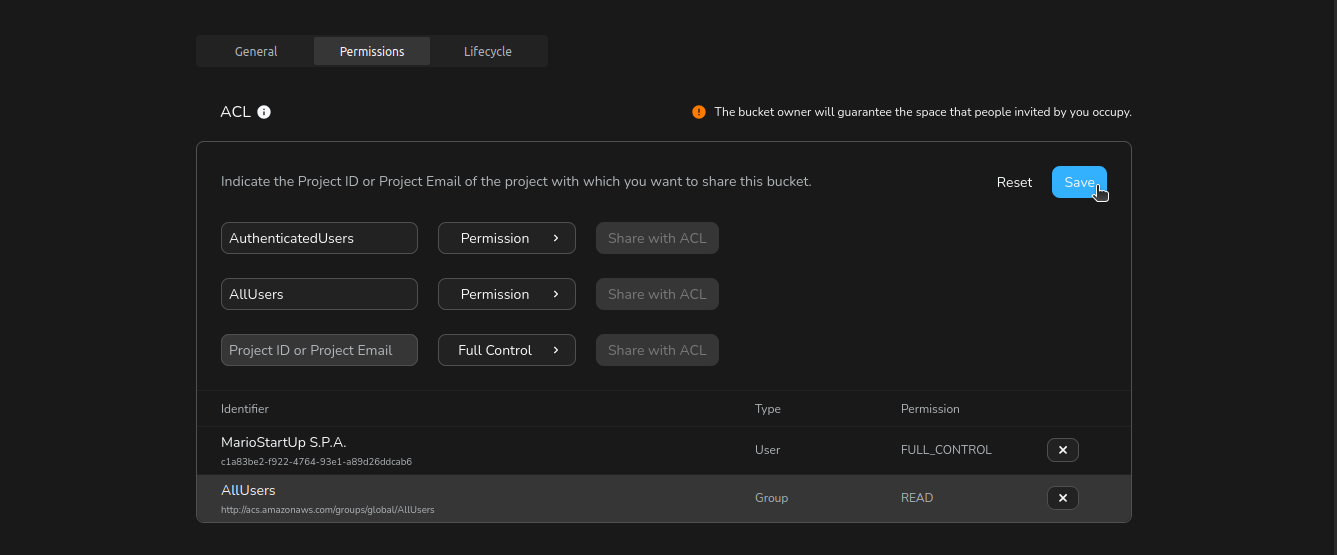
- When finished, click Save at the top of the ACL section to apply your changes.
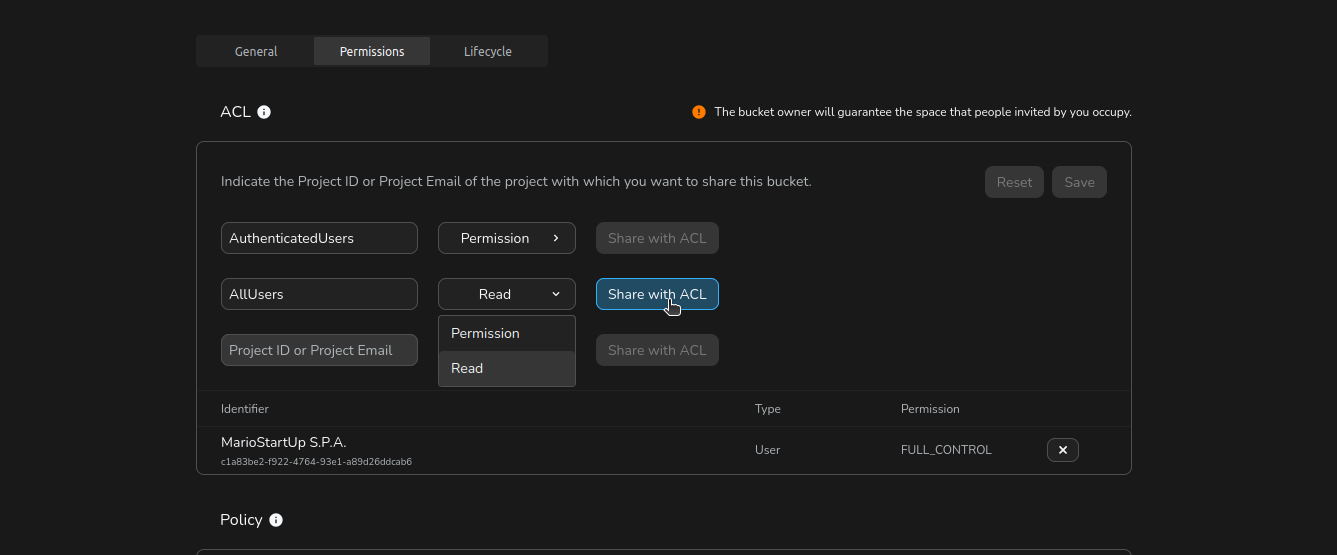
Tip: Changes are not applied until you click Save. Review your ACL entries before saving.
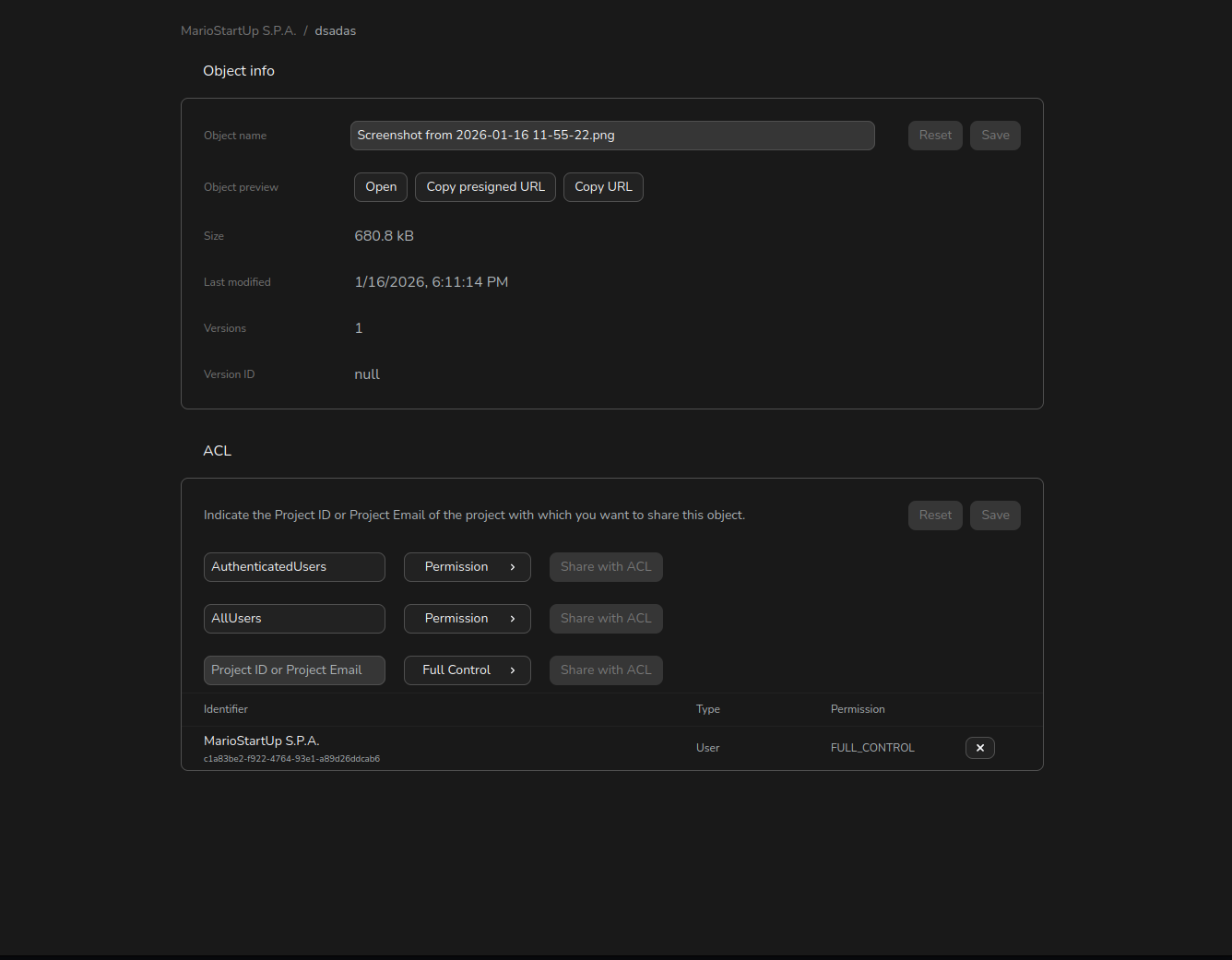
To reach ACLs for an object:
- In the Buckets list, click on your bucket to open it.
- Locate the object you want to manage, open its context menu (click the 3-dots or right-click the object name), and select Object details.
- Scroll to the Access Control List (ACL) section to see current ACL entries.
 git
git
FAQ
How can I change previously set ACLs of an object or a bucket?
To change previously set ACLs of a bucket or an object you just need to overwrite them.
May I give the same permission to the same Grantee more than once?
Yes, you may give the same permission to the same Grantee more than once.
See user Luigi from the example below.
aws s3api get-bucket-acl --endpoint <your-endpoint-gateway> --profile cubbit --bucket my-cubbit-bucket | cat
{
    "Owner": {
        "DisplayName": "Mario",
        "ID": "eb91a08c-988f-48bb-ab17-f66d90ff4971"
    },
    "Grants": [
        {
            "Grantee": {
                "DisplayName": "Mario",
                "ID": "eb91a08c-988f-48bb-ab17-f66d90ff4971",
                "Type": "CanonicalUser"
            },
            "Permission": "FULL_CONTROL"
        },
        {
            "Grantee": {
                "DisplayName": "Luigi",
                "ID": "23e5661e-71a1-4f75-b8df-4e0a504df356",
                "Type": "CanonicalUser"
            },
            "Permission": "FULL_CONTROL"
        },
        {
            "Grantee": {
                "DisplayName": "Luigi",
                "ID": "23e5661e-71a1-4f75-b8df-4e0a504df356",
                "Type": "CanonicalUser"
            },
            "Permission": "FULL_CONTROL"
        }
    ]
}
May I give READ, WRITE and FULL_CONTROL permissions to the same Grantee?
Yes, you may give READ, WRITE and FULL_CONTROL permissions to the same Grantee.
See user Luigi from the example below.
{
    "Owner": {
        "DisplayName": "Mario",
        "ID": "eb91a08c-988f-48bb-ab17-f66d90ff4971"
    },
    "Grants": [
        {
            "Grantee": {
                "DisplayName": "Mario",
                "ID": "eb91a08c-988f-48bb-ab17-f66d90ff4971",
                "Type": "CanonicalUser"
            },
            "Permission": "FULL_CONTROL"
        },
        {
            "Grantee": {
                "DisplayName": "Luigi",
                "ID": "23e5661e-71a1-4f75-b8df-4e0a504df356",
                "Type": "CanonicalUser"
            },
            "Permission": "READ"
        },
        {
            "Grantee": {
                "DisplayName": "Luigi",
                "ID": "23e5661e-71a1-4f75-b8df-4e0a504df356",
                "Type": "CanonicalUser"
            },
            "Permission": "WRITE"
        },
        {
            "Grantee": {
                "DisplayName": "Luigi",
                "ID": "23e5661e-71a1-4f75-b8df-4e0a504df356",
                "Type": "CanonicalUser"
            },
            "Permission": "FULL_CONTROL"
        }
    ]
}
How ACL & Identity-based policies combine together
When a request is made to access a bucket or an object, both the identity-based policy (IAM policy) and the ACL are evaluated to determine whether the request should be allowed or denied.
In the following table we want to show the combinations with ACL in some useful case
| Root/IAM | IAM policy | ACL | Entity owner | Result | |||
|---|---|---|---|---|---|---|---|
| Allow | Deny | Missing | Allow | Missing | |||
| Root | ✅ | ❌ | ❌ | ❌ | ✅ | ❌ | ❌ |
| Root | ✅ | ❌ | ❌ | ✅ | ❌ | ❌ | ✅ |
| IAM | ❌ | ❌ | ✅ | ❌ | ✅ | ❌ | ❌ |
| IAM | ❌ | ❌ | ✅ | ✅ | ❌ | ❌ | ❌ |
| IAM | ❌ | ✅ | ❌ | ❌ | ✅ | ❌ | ❌ |
| IAM | ❌ | ✅ | ❌ | ✅ | ❌ | ❌ | ❌ |
| IAM | ✅ | ❌ | ❌ | ❌ | ✅ | ❌ | ❌ |
| IAM | ✅ | ❌ | ❌ | ✅ | ❌ | ❌ | ✅ |
| Root | ✅ | ❌ | ❌ | ❌ | ✅ | ✅ | ❌ |
| Root | ✅ | ❌ | ❌ | ✅ | ❌ | ✅ | ✅ |
| IAM | ❌ | ❌ | ✅ | ❌ | ✅ | ✅ | ❌ |
| IAM | ❌ | ❌ | ✅ | ✅ | ❌ | ✅ | ❌ |
| IAM | ❌ | ✅ | ❌ | ❌ | ✅ | ✅ | ❌ |
| IAM | ❌ | ✅ | ❌ | ✅ | ❌ | ✅ | ❌ |
| IAM | ✅ | ❌ | ❌ | ❌ | ✅ | ✅ | ✅ |
| IAM | ✅ | ❌ | ❌ | ✅ | ❌ | ✅ | ✅ |
CRN
The Cubbit Resource Name (CRN) is a standardized way to identify resources in Cubbit. It is used in policies to specify the resources to which the policy applies.
CRN v2
crn:region:service:resource-type:resource-path
-
crn: the static string needed by the validator
-
region: the region of the coordinator deploy
-
service: the service involved (s3, iam, ds3)
-
resource-type: entity type provided by the service (user, group, policy, project, bucket, object)
-
resource-path: it identifies the specific resource. The format of this segment depends on the resource-type. It can be a single id, or a path-like structure for resources that are hierarchical in nature (like objects in a bucket). e. g.
tenant_<tenant_id>/project_<project_id>/<user_id>
In some cases you want to target all the resources of a certain type.
In that case, you can specify the wildcard * as resource-path or last segment of the path.
e.g.
✅ crn:region:service:resource-type:*
✅ crn:region:service:resource-type:tenant_<tenant_id>/project_<project_id>/*
❌ crn:region:service:resource-type:tenant_*/project_<project_id>/<resource_id>
❌ crn:region:service:resource-type:tenant_*/project_<project_id>/*
Another special target is self in the resource-path segment. This allows the policy to be generic and when you assign the policy to a specific user, the self keyword will be replaced with the id of the user. This special case can be used only combined with resource-type of user.
e.g. crn:region:iam:user:self
Migrate from CRN v1 to CRN v2
To convert a CRN v1 to a CRN v2 follow this pattern:
- crn region service remain the same
- resource-type will be the same
- tenant-id, swarm-id and project-id will be part of the resource-path as
tenant_<tenant_id>/project_<project_id>/ - resource-id will be appended at the end of the resource-path
If you do not have the id, do not add that segment to the resource-path for that resource.
CRN v1 (Deprecated)
CRN v1 is deprecated and will be removed in future releases. Please migrate your policies to CRN v2 format.
crn:region:service:tenant-id:swarm-id:project-id:resource-type:resource-id
-
crn: the static string needed by the validator
-
region: the region of the coordinator deploy
-
service: the service involved (s3, iam, ds3)
-
tenant-id: the reference id to the tenant of your account (can be omitted)
-
swarm-id: the reference id to the geo-distributed cluster of nodes (must be omitted)
-
project-id: the id of the project to which the specified resource belongs. (can be omitted)
-
resource-type: the entity provided by the service (user, group, policy, project, bucket, object)
-
resource-id: the specific id or name of the target resource
In some cases you want to target all the resources of a certain type. In that case, you can specify the wildcard * as resource-id.
crn:region:service:tenant:swarm:project-id:resource-type:*
At the moment the wildcard is allowed only for the resource-id segment
Another special target is self in the resource_id segment. This allows the policy to be generic and when you assign the policy to a specific user, the self keyword will be replaced with the id of the user. This special case can be used only combined with resource_type of user.