Smart Cache
Intro
Smart Cache is a transparent S3 read-through cache you deploy in front of an S3 backend. It sits between your applications and the origin, answers reads from a two-tier cache, and forwards everything else.
| Tier | Where it lives | What it is for |
|---|---|---|
| L1 | RAM, inside the pod | The hottest objects. A few hundred MB of RAM turns repeated reads of the same keys into memory hits. |
| L2 | Local SSD on the node | More data than RAM can hold. Objects read l1_promotion_threshold times are promoted to L1. |
A read walks the tiers in order: serve from L1 if it is there, else from L2, else fetch from the backend and cache what comes back. Only reads use the cache: a GET populates it, a HEAD answers from it. Requests carrying a Range header or a query string bypass it entirely, and so does anything the backend does not answer with a 200, a known Content-Length, and a body within l2_max_object_size_bytes.
Every hit says where it came from:
X-Smart-Cache: HIT
X-Smart-Cache-Tier: L2
The benefit is latency and origin load. A dataset that is read over and over — training data, model artefacts, build inputs, media — is fetched from the backend once and then served from the node next to it. Because the origin is always the source of truth, losing the cache costs a re-fetch, never data.
Architecture

Two things decide how you size and scale the deployment:
- The cache is per node, not cluster-wide. The L2 directory is a
hostPathmount: pods on the same node share it, pods on different nodes each build their own. There is no cross-node cache sharing. - Configuration is per pod, and lives in a ConfigMap. Each pod re-reads that ConfigMap every sync interval (
30s), so a save from the console reaches every replica within that window.
Installing it on Kubernetes
Smart Cache ships as the container image cubbit/gods3-smart-cache on Docker Hub. The manifest below runs the latest tag; pin an MT<date>-<commit> tag instead when you need a reproducible build (see Upgrading to a new version).
It installs with one file and one command. Save this as smart-cache.yaml:
apiVersion: v1
kind: Namespace
metadata:
  name: smart-cache
---
# The console login: the password "changeme", bcrypt-hashed and base64-encoded.
# Change it before you apply, or right after from the console's Profile.
apiVersion: v1
kind: Secret
metadata:
  name: smart-cache-admin-credentials
  namespace: smart-cache
type: Opaque
data:
  password-hash: SkRKNUpERXdKRk5LWlVnelRqRnRaVVJ3YjJ4dVpFdHRPVTl6WW5WemNqRk9iekZKUjJvM1ptNVZiV1JJUlhCa1VqaFRkMjlMYjFKVlVESlg=
  signing-key: TURFeU16UTFOamM0T1RBeE1qTTBOVFkzT0Rrd01USXpORFUyTnpnNU1ERT0=
---
# Guards /_cache/admin/v1/* on the proxy port.
apiVersion: v1
kind: Secret
metadata:
  name: smart-cache-internal-auth-token
  namespace: smart-cache
type: Opaque
data:
  token-allowed-list: cmVwbGFjZS1tZS13aXRoLWEtcmFuZG9tLXRva2Vu
---
# Seals L2 entries at rest, once encryption is switched on from the console.
apiVersion: v1
kind: Secret
metadata:
  name: gods3-smart-cache-encryption-key
  namespace: smart-cache
type: Opaque
data:
  encryption-key: TURFeU16UTFOamM0T1RBeE1qTTBOVFkzT0Rrd01USXpORFUyTnpnNU1ERT0=
---
# Intentionally empty: every setting has a working default, and the console is
# where you configure the cache. Declared with no keys at all, so that
# re-applying this file never overwrites what the console has written back.
apiVersion: v1
kind: ConfigMap
metadata:
  name: gods3-smart-cache-admin-config
  namespace: smart-cache
data: {}
---
apiVersion: v1
kind: ServiceAccount
metadata:
  name: gods3-smart-cache
  namespace: smart-cache
---
apiVersion: rbac.authorization.k8s.io/v1
kind: Role
metadata:
  name: gods3-smart-cache-admin
  namespace: smart-cache
rules:
  - apiGroups: [""]
    resources: ["configmaps"]
    resourceNames: ["gods3-smart-cache-admin-config"]
    verbs: ["get", "update"]
  - apiGroups: [""]
    resources: ["configmaps"]
    verbs: ["create"]
  - apiGroups: [""]
    resources: ["secrets"]
    resourceNames:
      - gods3-smart-cache-encryption-key
      - smart-cache-admin-credentials
      - smart-cache-internal-auth-token
    verbs: ["get", "update"]
  - apiGroups: [""]
    resources: ["secrets"]
    verbs: ["create"]
---
apiVersion: rbac.authorization.k8s.io/v1
kind: RoleBinding
metadata:
  name: gods3-smart-cache-admin
  namespace: smart-cache
roleRef:
  apiGroup: rbac.authorization.k8s.io
  kind: Role
  name: gods3-smart-cache-admin
subjects:
  - kind: ServiceAccount
    name: gods3-smart-cache
    namespace: smart-cache
---
apiVersion: v1
kind: Service
metadata:
  name: gods3-smart-cache
  namespace: smart-cache
spec:
  type: ClusterIP
  ports:
    - port: 9180
      targetPort: proxy
      name: proxy
    - port: 9181
      targetPort: internal
      name: internal
  selector:
    app: gods3-smart-cache
---
# Its own Service, with session affinity: the console's session and its job
# list are per-pod state, so one browser must keep reaching the same replica.
apiVersion: v1
kind: Service
metadata:
  name: gods3-smart-cache-admin
  namespace: smart-cache
spec:
  type: ClusterIP
  sessionAffinity: ClientIP
  ports:
    - port: 8082
      targetPort: admin
      name: admin
  selector:
    app: gods3-smart-cache
---
apiVersion: apps/v1
kind: Deployment
metadata:
  name: gods3-smart-cache
  namespace: smart-cache
spec:
  replicas: 1
  selector:
    matchLabels:
      app: gods3-smart-cache
  template:
    metadata:
      labels:
        app: gods3-smart-cache
    spec:
      serviceAccountName: gods3-smart-cache
      containers:
        - name: gods3-smart-cache
          image: cubbit/gods3-smart-cache:latest
          imagePullPolicy: Always
          env:
            - name: GODS3_SMART_CACHE_HTTP_PORT
              value: "9180"
            - name: GODS3_SMART_CACHE_HTTP_INTERNAL_PORT
              value: "9181"
            - name: GODS3_SMART_CACHE_INTERNAL_AUTH_TOKEN_ALLOWED_LIST
              valueFrom:
                secretKeyRef:
                  name: smart-cache-internal-auth-token
                  key: token-allowed-list
            - name: GODS3_SMART_CACHE_ENCRYPTION_KEY
              valueFrom:
                secretKeyRef:
                  name: gods3-smart-cache-encryption-key
                  key: encryption-key
            - name: GODS3_SMART_CACHE_ADMIN_CONFIGMAP_NAME
              value: gods3-smart-cache-admin-config
            - name: GODS3_SMART_CACHE_ADMIN_NAMESPACE
              valueFrom:
                fieldRef:
                  fieldPath: metadata.namespace
            - name: GODS3_SMART_CACHE_ADMIN_HTTP_PORT
              value: "8082"
            - name: GODS3_SMART_CACHE_ADMIN_USERNAME
              value: admin
            - name: GODS3_SMART_CACHE_ADMIN_CONFIG_SYNC_INTERVAL
              value: 30s
            - name: GODS3_SMART_CACHE_ADMIN_ENCRYPTION_KEY_SECRET_NAME
              value: gods3-smart-cache-encryption-key
            - name: GODS3_SMART_CACHE_ADMIN_CREDENTIALS_SECRET_NAME
              value: smart-cache-admin-credentials
            - name: GODS3_SMART_CACHE_ADMIN_INTERNAL_AUTH_TOKEN_SECRET_NAME
              value: smart-cache-internal-auth-token
          ports:
            - name: proxy
              containerPort: 9180
            - name: internal
              containerPort: 9181
            - name: admin
              containerPort: 8082
          livenessProbe:
            httpGet:
              path: /health
              port: internal
            initialDelaySeconds: 15
            periodSeconds: 20
          readinessProbe:
            httpGet:
              path: /readyz
              port: internal
            initialDelaySeconds: 15
            periodSeconds: 60
            timeoutSeconds: 5
          resources:
            requests:
              cpu: 500m
              memory: 1Gi
            limits:
              memory: 1Gi
          volumeMounts:
            - name: cache-volume
              mountPath: /cache
      volumes:
        - name: cache-volume
          hostPath:
            path: /var/cache/gods3-smart-cache
            type: DirectoryOrCreate
Apply it:
kubectl apply -f smart-cache.yaml
kubectl -n smart-cache rollout status deployment/gods3-smart-cache
The file creates the namespace, the login, the three secrets, the ConfigMap, the RBAC the console needs, both Services and the Deployment. Every object carries namespace: smart-cache explicitly, which means the file behaves the same whether or not your kubectl context has a default namespace.
The ConfigMap is empty on purpose
data: {} is not an oversight:
- Every setting has a working default compiled into the service. No keys means "run with the documented defaults", and the pod starts and serves.
- The console is where you configure it. The first save from the browser writes the whole configuration into this same ConfigMap as a
config.jsonkey. Hand-writing JSON is never required. - Re-applying this file will not wipe that configuration. Because the file declares no keys,
kubectl applyleaves whatever the console wrote untouched. Declaringconfig.json: {}here instead would reset the configuration to defaults on every re-apply.
The keys a save writes, all optional, all at these defaults:
{
  "backend_address": "https://s3.cubbit.eu",
  "l1_max_size_bytes": 536870912,
  "l1_max_object_size_bytes": 10485760,
  "l1_promotion_threshold": 3,
  "l2_cache_dir": "/cache/shared",
  "l2_tmp_dir": "/cache/tmp",
  "l2_max_size_bytes": 107374182400,
  "l2_max_object_size_bytes": 5368709120,
  "l2_eviction_threshold": 0.90,
  "l2_eviction_target": 0.75,
  "l2_ttl": "24h",
  "l2_scanner_interval": "1h",
  "prefetch": {
    "enabled": true,
    "rate_limit": "100/s",
    "default_grace_period": "1h",
    "max_grace_period": "24h"
  },
  "internal_auth": {
    "enable_internal_secret_guards": true,
    "secret_header_key": "x-cbt-internal-auth"
  },
  "encryption": {"enabled": false}
}
Sizes are in bytes (536870912 = 512 MiB), durations are strings like "1h" or "5m". prefetch.enabled is not a choice: the service forces it back to true on every read and every write, so a stored false is ignored. Only the rate limit and the grace-period bounds are yours to tune.
Once the pod runs, the ConfigMap is the live configuration and the console is its editor. kubectl edit configmap gods3-smart-cache-admin-config works and is picked up within the sync interval (30s), but a later save from the console overwrites it. Pick one as your source of truth per environment.
Regenerate the shipped secrets
signing-key, token-allowed-list and encryption-key in the file are placeholders: valid, so the pod starts, but published in this documentation. Replace them for anything that is not a test.
# signing-key and encryption-key: 32 random bytes, base64 twice
openssl rand -base64 32 | base64

# token-allowed-list: any opaque string, base64 twice
openssl rand -hex 16 | base64
The double encoding is what the Secret needs: once because the service expects the value wrapped in base64, once because Kubernetes Secret.data is base64 on the wire.
The console rotates the signing key and the encryption key later without showing their values, and the internal auth token is edited from its Internal auth section.
The administrator password
The file ships the literal password changeme. Change it right after applying, from the console's Profile page — the easier path, and the one that needs no tooling.
To set it in the file instead, generate the hash and put it in password-hash:
printf '%s' 'your-password' | htpasswd -inBC 10 '' | tr -d ':\n' | base64 | base64
Ports
| Port | Name | Serves |
|---|---|---|
9180 | proxy | S3 traffic, and the /_cache/admin/v1/* admin API |
9181 | internal | /health, /readyz, /configurations, /metrics |
8082 | admin | the console itself |
Liveness and readiness probe the internal port, so a pod that reports ready is a pod that can serve.
Upgrading to a new version
With image: ...:latest and imagePullPolicy: Always, the pod pulls the current build every time it starts. A new release does not roll the Deployment by itself, so force the rollout:
kubectl -n smart-cache rollout restart deployment/gods3-smart-cache
kubectl -n smart-cache rollout status deployment/gods3-smart-cache
To pin a version instead, change the tag and re-apply:
# in smart-cache.yaml
#   image: cubbit/gods3-smart-cache:MT26.11.25-a893260

kubectl apply -f smart-cache.yaml
kubectl -n smart-cache rollout status deployment/gods3-smart-cache
Only the pod is replaced. The ConfigMap keeps the configuration the console wrote (the file declares data: {}), the secrets are their own objects, the RBAC is unchanged, and the L2 cache stays on the node: the new pod mounts the same hostPath, so a previously cached object is still a HIT after the upgrade.
A configuration change needs no restart either — the pod re-reads the ConfigMap on its sync interval.
latest moves, and it is amd64 only. The tag is re-pointed at each release, so two clusters on it can be running different builds, and a rollback means re-applying an older tag. It is published for linux/amd64 only: on arm64 nodes use an MT<date>-<commit> tag, which is a multi-arch image index covering both.
Exposing the S3 endpoint
Anything that reads your data should reach the proxy; the console should be reachable by you, and nobody else.
apiVersion: networking.k8s.io/v1
kind: Ingress
metadata:
  name: smart-cache-proxy
  namespace: smart-cache
spec:
  ingressClassName: nginx
  rules:
    - host: cache.example.com
      http:
        paths:
          - path: /
            pathType: Prefix
            backend:
              service:
                name: gods3-smart-cache
                port:
                  number: 9180
Your applications then use https://cache.example.com as an S3 endpoint, with their own credentials, exactly as they would use the backend directly — the same access key pair they already use against Cubbit, or a dedicated one from a service account (see the API keys section of the Quickstart). The proxy expects path-style addressing: https://cache.example.com/<bucket>/<key>.
Add the usual tls: block (plus cert-manager.io/cluster-issuer in the annotations if you run cert-manager) to serve it over HTTPS. To try it before exposing anything, kubectl -n smart-cache port-forward svc/gods3-smart-cache 9180:9180 is enough.
Reaching the console
kubectl -n smart-cache port-forward svc/gods3-smart-cache-admin 8082:8082
Then open http://localhost:8082. This is the recommended route, and for most environments the only one you need.
The console is a single administrator login: no user management, no roles, no per-user audit trail. Do not expose it on a public hostname without an additional layer in front of it — a VPN, an IP allow-list at the ingress, or your identity proxy. If you do publish it, use a hostname rather than a path prefix (the console is a single-page app served from / with its API at /api/*), and keep the sessionAffinity: ClientIP of its Service: with more than one replica, a login and its session are per-pod state.
Using the console
With the console reachable, everything below happens in the browser. Nothing here needs kubectl.
The console opens on a dashboard that answers the questions you have about a cache: is it working, how full is each tier, and is anything being evicted.
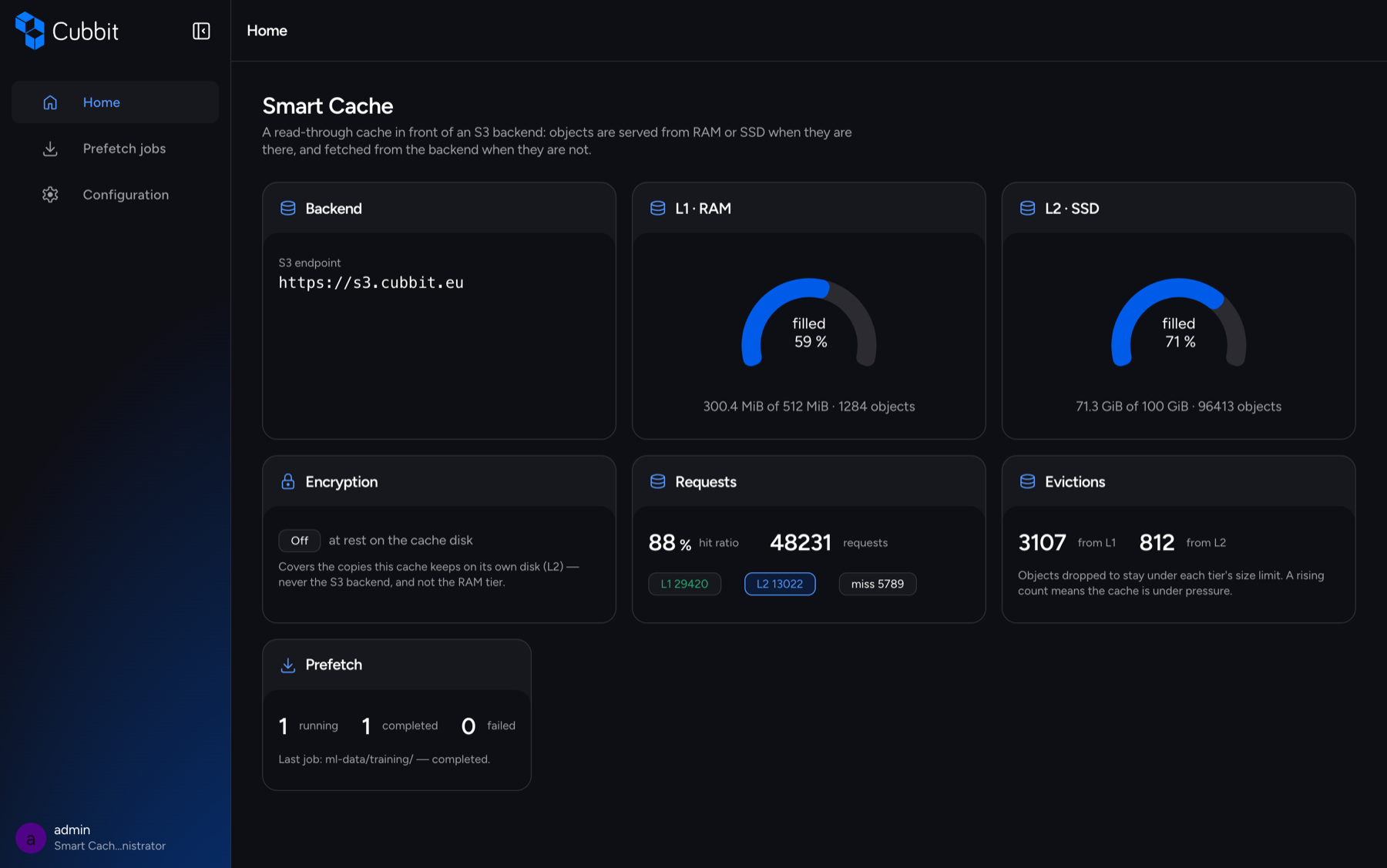
A high hit ratio with a steady eviction count is healthy: the tiers are full and earning their keep. A hit ratio that falls while evictions climb means the tiers are too small for the working set.
Configuration is grouped into four sections, in a second column beside the main menu. One section is on screen at a time, but the form always holds all of them: switching sections changes what you see, never what you have edited.
| Section | What it controls |
|---|---|
| App settings | The backend endpoint, the size of each tier, the per-object caps and the eviction watermarks. |
| Prefetch | The rate limit and the grace-period bounds prefetch jobs are subject to. |
| Internal auth | The shared-secret header that guards /_cache/admin/v1/*. The accepted token list is never displayed: setting a new one replaces it. |
| Encryption | L2 encryption at rest, and rotation of the XChaCha20-Poly1305 key. Rotating does not re-encrypt what is already on disk: those entries are re-fetched and re-cached under the new key, so expect a temporary dip in the L2 hit ratio. |
Fields are validated as you type. There is one Save for the whole page, so an error anywhere blocks it; the section holding the error carries a count on its row, and a banner names it and links to it. Reset to defaults loads the documented defaults into the form and discards your edits — it is not a save, press Save afterwards to write them. A save is applied as soon as it lands, with no restart and no redeploy.
Prefetch jobs
Warming the cache before a known spike is a one-off action, so it lives on its own screen rather than in the configuration.
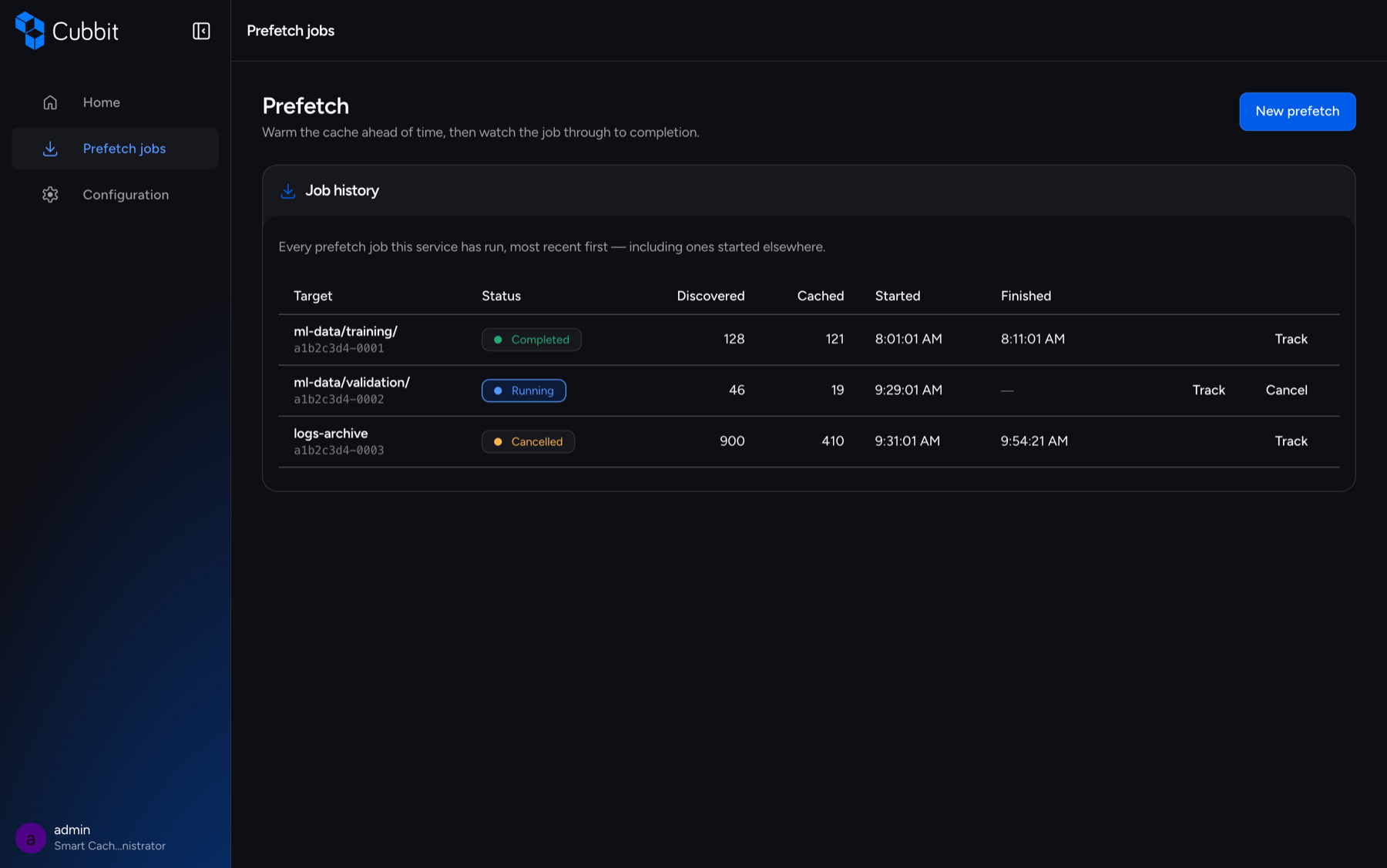
The list is the history: every job this pod has run, with status, target and object counts. Tracking one brings it to the top; a running job can be cancelled from either place.
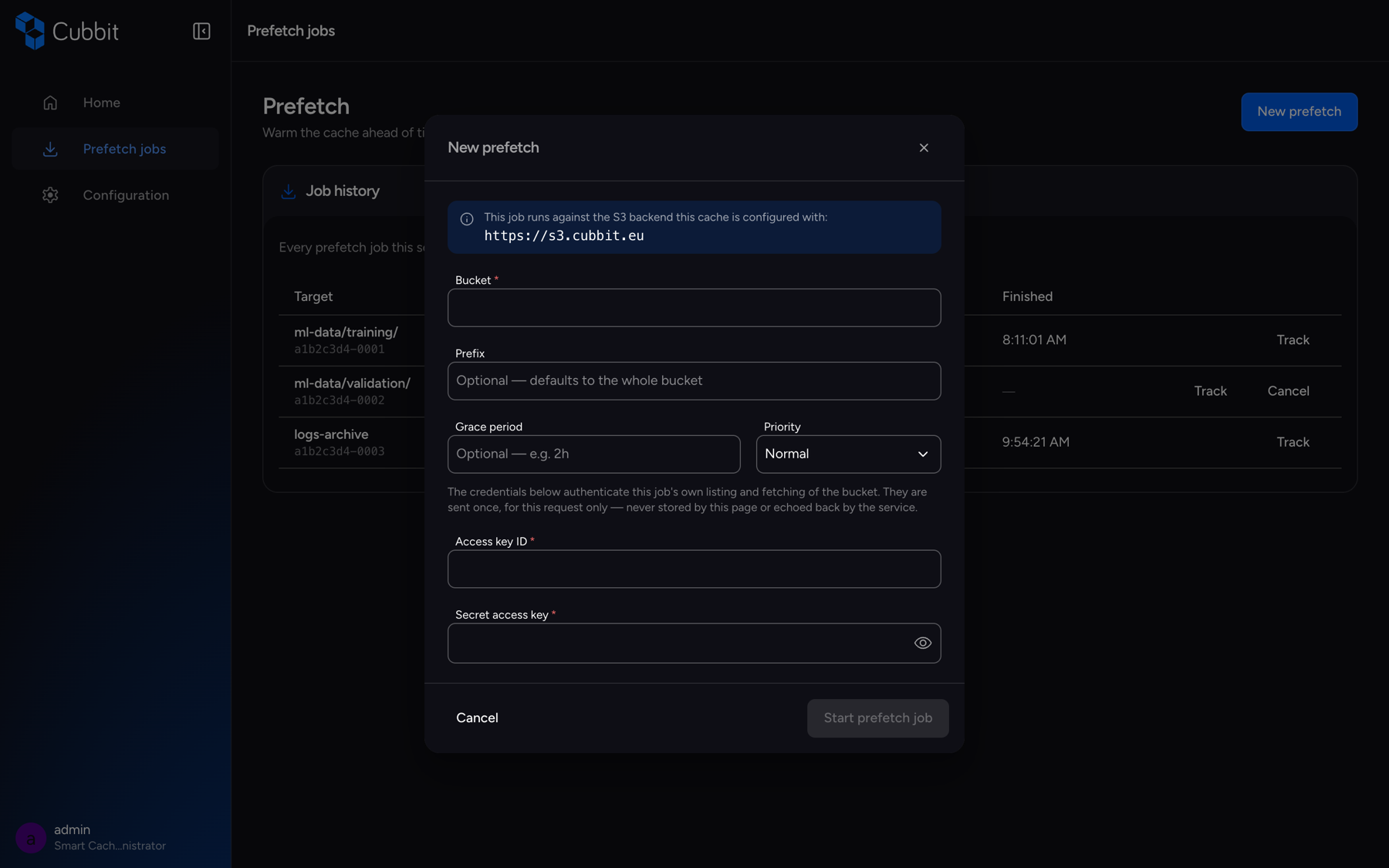
Starting a job asks for the bucket, an optional prefix, a grace period and a priority, plus S3 credentials for the listing and the fetches. It runs against the backend configured for the cache, and objects already cached, or larger than the L2 object-size limit, are skipped rather than re-fetched.
Grace period is what makes prefetch worth using: entries a job creates are protected from eviction until it expires, so you can warm data for a batch that starts later.
Your own credentials
Profile is reached from the account menu, because nothing on it is part of the cache configuration. It holds the two credentials that belong to the console rather than to the cache: the login password, which takes effect immediately and does not sign existing sessions out, and the session-signing key, whose rotation invalidates every session including yours.
This is the right place to replace the shipped changeme password with one only you know.
Operating notes
- The cache is per node. Two replicas on two nodes keep two independent L2 caches. That is by design; size each one for the working set the node will see.
- A write through the proxy invalidates L2, not L1.
PUTandDELETEare forwarded to the backend and delete the on-disk copy, so the next read goes to the origin — unless the object had already been promoted to L1, in which case it keeps being served from RAM untill2_ttlexpires. The same applies to aDELETE: the object is gone from the backend and from L2, and a promoted copy is still returned from memory for up tol2_ttl. A write that bypasses the proxy, straight to the backend, is invisible to the cache until then as well. Sizel2_ttlwith this in mind: it is the longest a stale read can survive. - Metrics are on the internal port.
GET /metricson9181exposes cache hits and misses by tier, evictions by reason, prefetch outcomes, and sizes. Point Prometheus at it. - The console is one administrator. No roles, no audit trail. Treat the password as the whole security boundary and keep the console off the public internet.