What is a Tenant?
A Tenant is the collection of users, projects, and policies with a dedicated UI and ancillary services managed by one or more Composer users. There is no limit to the number of Tenants an Organization owner can create.
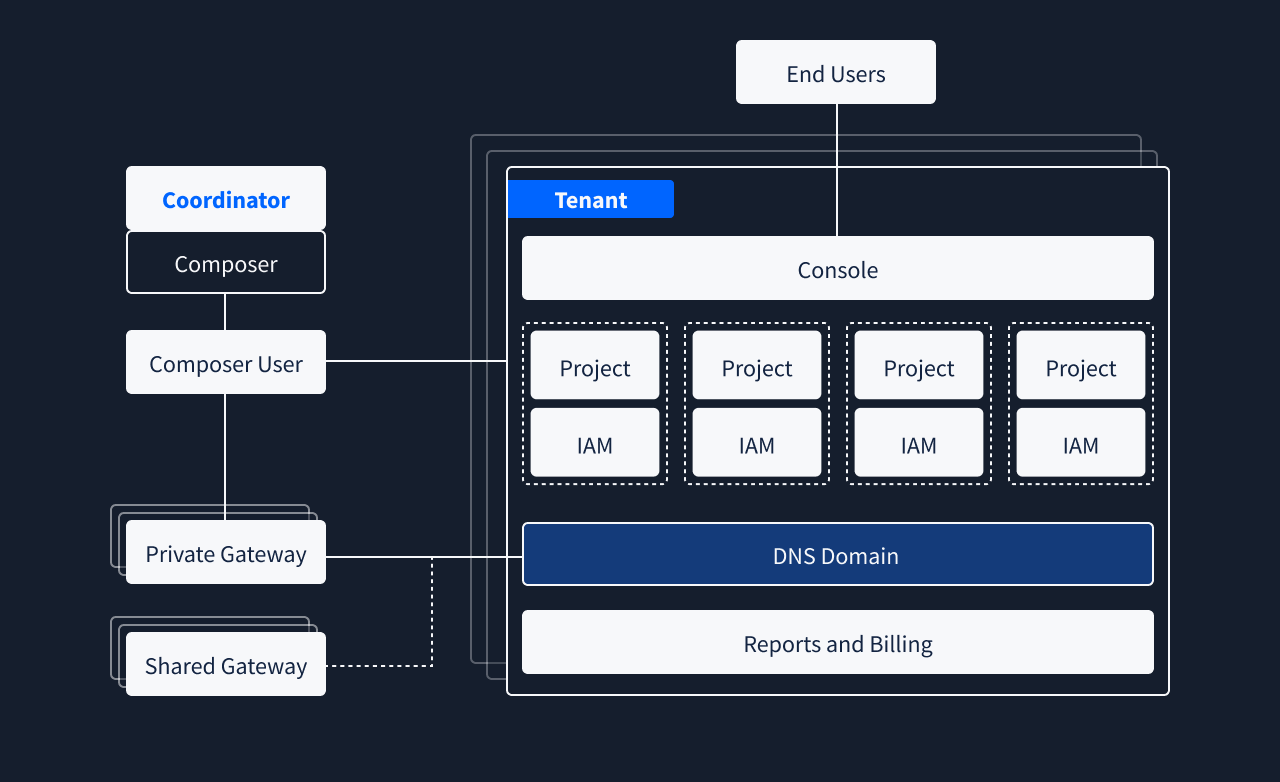
Tenant Overview
You should see all the Tenants you are authorised to view in the Composer Tenants page. Selecting one of them allows you to access the tenant-specific section where a first overview is visible.
The overview displays the Tenant console, gateway, the name of the storage connected to it, and other information about the used resources and status. Multiple notification bars can be enabled to inform you about persistent or temporary issues. Read them and follow the suggested action to resolve them.
A sidebar allows navigation into Tenant-specific sections. The visible sections are:
- Overview
- Connections
- DS3 Users
- DS3 Buckets
- DS3 Projects
- Settings
The Connections section manages how the Tenant is reachable: link domains to gateways and configure TLS.
The DS3 Users, DS3 Buckets, and DS3 Projects sections are not yet available in Composer. They currently show a preview and link to the legacy Dashboard, where you can manage the corresponding Tenant resources.
The Settings section contains the Tenant's configuration options. It includes the Tenant details form, where some fields such as the Tenant name are read-only and others can be edited, and the Danger zone for destructive actions. Additional settings will be added as they become available in Composer.
Changes in Settings apply to the Tenant configuration. To manage existing DS3 users, buckets, or projects, use the legacy Dashboard until those sections are available in Composer.